Updated: July 29th, 2021
Introduction
 Screen is awesome. Once you become comfortable navigating around it, you start using it ALL the time. No more dropped sessions, no having 10 Putty windows open at the same time, no more nohup.
However, with default screen settings I've always felt a bit lost and out of place, mostly because there was no "taskbar" with a bird's eye view of all windows. Pressing ctrl-a, " really does get annoying fast (that's the command that brings up the window selector – screenshot below).
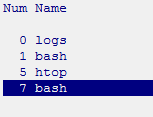
So instead I modded my screen to have a "taskbar" which sits at the bottom of screen and adds:
 beer planet is a blog about technology, programming, computers, and geek life. It is run by Artem Russakovskii - a local San Francisco geek who is currently pursuing his own projects and regularly enjoys hacking Android, PHP, CSS, Javascript, AJAX, Perl, and regular expressions, working on Wordpress plugins and tools, tweaking MySQL queries and server settings, administering Linux machines, blogging, learning new things, and other geeky stuff.


