[Updated x3] Goodbye Outlook, I Don't Need You Anymore – Gmail Now Lets You Paste Images Directly From Clipboard
 There used to be a time when you couldn't imagine your life without Microsoft's Outlook – web email clients were pathetic and non-functional, Internet access was scarce, and access to certain advanced features was only possible with a desktop application like Outlook.
Then, Gmail arrived and exploded the whole notion of desktop email clients forever, almost overnight. It was fast, robust, logical, and integrated – many things Outlook still isn't to this day (Outlook 2010 + IMAP is pure hell).
Slowly, Google brought out more and more features that made the fine line between web and desktop emailing thinner and thinner, and today, it finally disappeared, at least for me.
The final nail in the coffin turned out to be …
Updated: July 26th, 2010
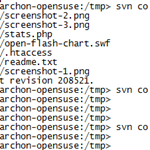 This is a quick recipe that I found pretty interesting and relatively unknown.
Everyone who uses SVN knows that most repositories are set up to allow viewing of their contents via a web browser. For example, here's the trunk of WP Plugins SVN: http://plugins.svn.wordpress.org/ and here is the current trunk version of a specific file, let's say http://plugins.svn.wordpress.org/stats/trunk/readme.txt.
The Problem
However, what if you wanted to view a specific revision of a file or directory in your browser?
Let's say I wanted revision 100,000 of http://plugins.svn.wordpress.org/stats/trunk/readme.txt
Normally, on a command line, you'd do something like
svn co http://plugins.svn.wordpress.org/stats/trunk/readme.txt stats cd stats; svn up -r100000 readme.txt |
or simply
It's always important to know for developers what browsers they are developing for, who dominates the market, and what the current trends are.
I have gotten my hands on the Plaxo.com visitors' browser stats for December of 2009.
This information is valuable because Plaxo has a relatively general demographics, as it's not a site only geeks or only moms visit, and the statistics tends to not be skewed. Therefore, as you can see, Firefox doesn't occupy the same share as you might see on a techy site (on this site, more than 50% of users visit in Firefox).
Also, since Plaxo has a couple million monthly visitors and therefore a couple million data points, statistically speaking these numbers are relatively …
 Ever since the introduction of the official Retweet button, I've wanted it to be a little more interactive. I usually want to add my 2 cents into the tweet I'm about to retweet but the default RT button just doesn't allow for it – Yes is the only option:

Troy's Twitter Script
Enter Troy's Twitter script for Firefox that I reviewed in detail a few months ago.
Troy's script added the RT button to my stream (along with inline picture and video embed, auto url expander and shortener, name autocomplete, and other things) way before Twitter introduced it.
It also allowed me to add a couple of words or rephrase the retweet to make it more relevant to my followers….
 As a backend developer, I don't get to work with JavaScript much anymore. However, from time to time, a project would come along that uses JavaScript (specifically, AJAX) to load some backend data on the fly. Of course, nothing works 100% right away*, so I would often have to tweak this JavaScript and massage it until it does what I need.
Here's where Firebug comes in with its JavaScript debugger. I'm used to using a debugger in every language I deal with, so using Firebug is a no brainer. Since it supports breakpoints, stopping execution and inspecting local variables and the rest of the scope generally beats alerts and console.logs for me.
Here's what a typical breakpoint looks …
 When I visited Mozilla's offices about 6 months ago, I saw a mobile testing station which included about 20-30 different phones lounging around, with their chargers plugged in. I knew something serious was coming soon. There were rumors about Firefox for Mobile for a while but nothing to really show for it. That was then…
Today, however, we know a lot more. Firefox for Mobile, codenamed Fennec, is coming next month (see More Info below) and looks very promising.
Here is a recent video of the Firefox's mobile and design teams discussing and showing the features of Mobile Firefox:
Feature Highlights
For the busy folks, here are the highlights from the video:

Introduction
Dear Skype,
you are great. You have the convenience of a nearby, well, convenience store and the UI that is acceptable to even an Apple fanboy (I'm not one, I'm just saying).
Skype also has a Firefox extension which finds all pieces of text that resemble phone numbers on web pages you are visiting and converts them into clickable Skype buttons  . One click and you're dialing the number. The premise is great but the execution… When it comes to your Firefox extension, Skype – you suck. You really suck.
The Problem Bullshit
So what makes me say these mean things? Is it the fact that when simply searching Google for "skype firefox", one finds mostly blog posts …
Updated: January 29th, 2010
 Today I found out something entirely new about framebusting and specifically clickjacking protection techniques.
I was working with a site that was using frames. Suddenly, one of the frames (which was hosted on a domain that differed from the one it was embedded in) displayed the following message (in Firefox 3.5.4):
This content cannot be displayed in a frame To protect your security, the publisher of this content does not allow it to be displayed in a frame. Click here to open this content in a new window |
To protect your security, the publisher of this content does
not allow it to be displayed in a frame.
Click here to
…
Essential Firefox Extensions (Plugins, Add-Ons) – A Comprehensive Guide :: Part 2 :: Pragmatic Extensions
Updated: September 27th, 2009
Introduction
Welcome to part 2 of the Essential Firefox Extensions And Tips – A Comprehensive Guide series. In this article I’m going to describe a number of time saving pragmatic extensions that make me a better, faster, more efficient browser user (browserer?).
Pragmatic Extensions
All-in-One Gestures
All-in-One Gestures introduces customizable gestures for all kinds of actions. To perform a gesture, hold the right (by default) button and move the mouse in the specified direction, drawing the needed shape.

I use it mostly for 3 things: history back/forward and close tab (see below). Once you start using gestures, there is no …
Firefox Being Slow, Especially Switching Tabs, High CPU Load, Memory Problems? Are You Using Firecookie For Firebug?
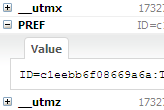 The Problem
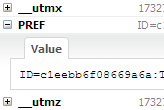
I use a lot of extensions. A LOT. They slow down my Firefox while giving something useful in return. Most of them are harmless and do not affect the speed too much but there are select few that are just CPU, memory, and performance hogs.
Until Firefox gets an extension manager that can show what the impact from each extension on time/CPU/memory is, one can resort to guessing, disabling, testing, and looking for clues to find these conniving little bastards.
Anyway, so where was I? Recently, my Firefox became increasingly unresponsive, especially when switching tabs. After some time, it was a pain to switch tabs altogether, so I had to resort to restarting the browser, only to …
Essential Firefox Extensions (Plugins, Add-Ons) And Tips – A Comprehensive Guide :: Part 1 :: Tips
Updated: June 10th, 2009
Introduction
In this article I’m going to discuss a number of useful Firefox extensions and tips. This list is not a “COMPLETE GUIDE TO FIREFOX!!!111!” but a collection of some, albeit many, extensions and techniques I find useful, with detailed descriptions and illustrations. I try to make my reviews as personal as possible and express my own points of view, so I will not be using any boring official descriptions altogether. Short, concise, and useful – that is my goal.
Right now I use 53 extensions in total. If you think that’s a lot, you might be right. However, because Firefox is so mature and new extensions come out every day, it is not as crazy of a number …
Updated: June 24th, 2020
 Introduction
Clickjacking is a malicious technique of tricking web users into revealing confidential information or taking control of their computer while clicking on seemingly innocuous web pages. A vulnerability across a variety of browsers and platforms, a clickjacking takes the form of embedded code or script that can execute without the user's knowledge, such as clicking on a button that appears to perform another function (credit: Wikipedia).
Clickjacking is hard to combat. From a technical standpoint, the attack is executed using a combination of CSS and iFrames, which are both harmless web technologies, and relies mostly on tricking users by means of social engineering. Additionally, the only server side technique against clickjacking known to me is “frame breaking…
Updated: September 5th, 2008
So Google Chrome – Google's attempt at an open source browser, came out yesterday and I took it out for a spin. At its heart is the Webkit engine (also open source) and Google Gears, powered by SQLite (can MySQL rival SQLite in applications like this?). Here are my thoughts.
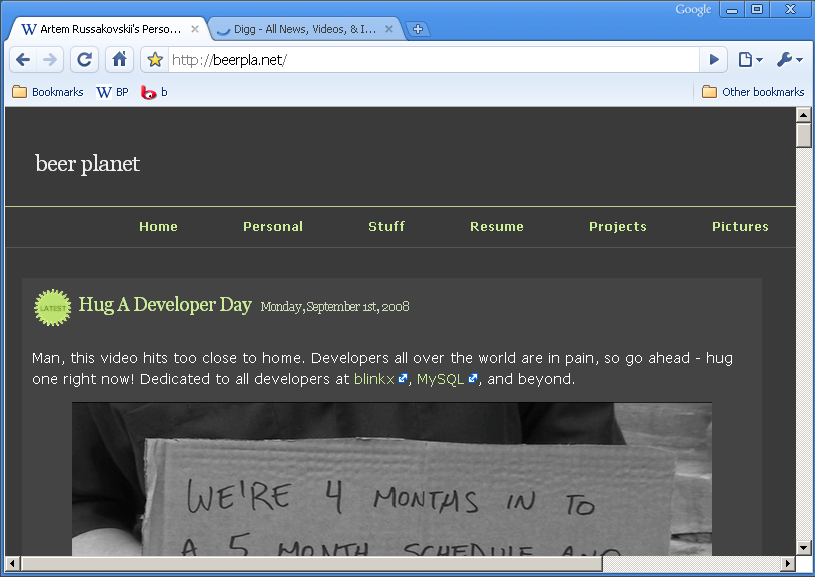
- Fast – Chrome loads extremely fast, blazing even. Granted, my Firefox would probably load fast if I didn't have any addons as well. Sites like Amazon or Digg load very fast. New tabs open instantly.
- Slow – http://www.blinkx.com/videos/channel:itn, seems like the combination of flash and html (or JS) on one page makes scrolling and redrawing quite slow.
- Very fluid design – I love how the tabs flow around
…
 beer planet is a blog about technology, programming, computers, and geek life. It is run by Artem Russakovskii - a local San Francisco geek who is currently pursuing his own projects and regularly enjoys hacking Android, PHP, CSS, Javascript, AJAX, Perl, and regular expressions, working on Wordpress plugins and tools, tweaking MySQL queries and server settings, administering Linux machines, blogging, learning new things, and other geeky stuff.


