Thoughts on Google Chrome
Wednesday, September 3rd, 2008
Updated: September 5th, 2008
So Google Chrome - Google's attempt at an open source browser, came out yesterday and I took it out for a spin. At its heart is the Webkit engine (also open source) and Google Gears, powered by SQLite (can MySQL rival SQLite in applications like this?). Here are my thoughts.
- Fast - Chrome loads extremely fast, blazing even. Granted, my Firefox would probably load fast if I didn't have any addons as well. Sites like Amazon or Digg load very fast. New tabs open instantly.
- Slow - http://www.blinkx.com/videos/channel:itn, seems like the combination of flash and html (or JS) on one page makes scrolling and redrawing quite slow.
- Very fluid design - I love how the tabs flow around when you drag them or make them pop in or out, I love how fluid animation and resizing is.
- Internal task manager - an absolutely brilliant idea. Since each tab and plugin get their own process, they don't affect each other. Any freezes are isolated to the process itself, so the days of hung browsers because of some buggy javascript should be gone gone (I'll actually have to see how well it works first).
- Great Google search integration and overall Firefox3-like url bar behavior.
- The word search functionality is amazing - best out of all browsers. It's incredibly fast, even on large pages, highlights all the matches, with the current one in orange, and more importantly, gives count (finally!). The search popup complements the fluidity perfectly.
-
History - looks great and has a timeline style. It's like reading a journal.
- View Source - again, best in class. Highlighting and line numbers by default. Url access style: view-source:http://digg.com. Search spread highlighting on the right. It's close to perfect, without using any plugins.
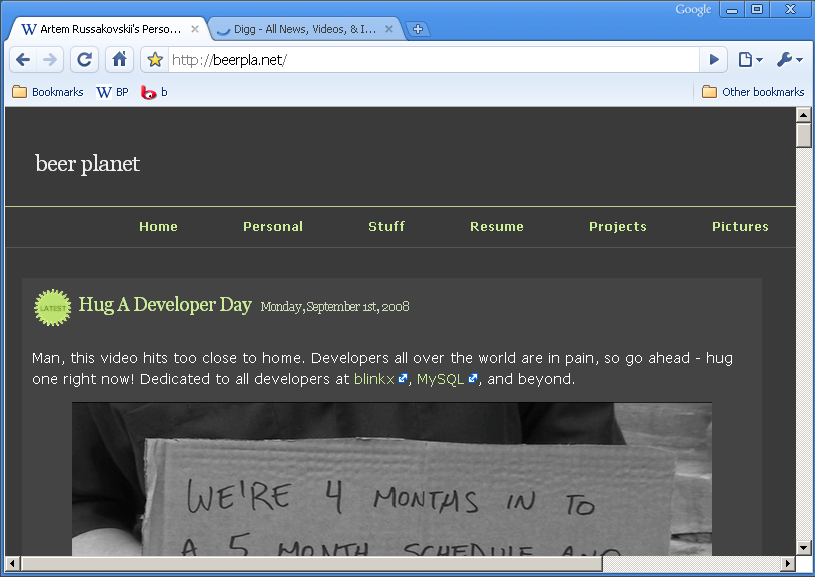
- My bookmarks, where art though? Where's the bookmarks menu? I know the homepage has them, and there's a pretty hidden way to make the bookmarks bar appear all the time (right click on it while on the home page and check 'Always show bookmarks bar' but that's not what I want. I like placing many-many bookmarks named with 1 or 2 letters onto the bookmarks bar (I found a way to emulate the behavior in the screenshot below). How can I create duplicates of the same bookmark in different places? It seems you can only bookmark in one. The interface to get around managing the bookmarks isn't well thought out, you can get to certain places only the certain way. How do you export/import bookmarks after the initial installation (I chose to skip mine)? Edit: Apparently, you can't yet.
- The homepage button is missing (though it can be enabled by Options->Show Home button on the toolbar). Why is it not on by default?
- I also enabled the following option right away (the main reason I use TabMix Plus for Firefox):
- Scrolling is very choppy and goes in huge jumps on my laptop (not the case in Firefox).
- Status bar - why do you disappear automatically when I get close to you? You can be so useful and display so much useful info? Stop disappearing!
- What with the Vista-style buttons? I have Win2k menus, which I find a lot simpler and easier on the eye. Why not inherit the window style?
- No Linux support. Hopefully coming soon.
- No addons supported or announced yet.
In conclusion, I understand the browser is very new and will probably go through many facelifts, UI changes, bug fixes, and enhancements but it has a lot to cover and if it's going to try to rival the giants, it better fix some things fast. I personally won't start using it until some addons start showing up, like the AI Roboform (AI Roboform has actually responded to this guy about such addon possibility) and Adblock Plus ones. However, for occasional browsing, it's great. Give it a spin.
Moving From Perl 5 to Perl 6 - What's New, Tutorial Style
Friday, August 22nd, 2008
Updated: August 28th, 2008
Newsflash: Perl 6 is not dead (in case you thought it was)!
I stumbled upon this most excellent series of posts by Moritz Lenz of perlgeek.de that describe the differences between Perl 5 and the upcoming Perl 6 (thanks to Andy Lester for the link). The posts are done in the form of tutorials, which helps comprehension. Simply awesome, Moritz.
It seems like Perl 6 is going to be a lot more object oriented, but such orientation is optional and not forced upon programmers, like in, say, Java. It warms my heart that I will be able to do this (you did see the new "say" function in Perl 5.10, right?):
1 2 3 | my Num $x = 3.4; say $x.WHAT; # Num say "foo".WHAT; # Str |
My favorite Perl 6 change so far is this:
1 2 3 4 5 6 7 8 9 | # named arguments
sub doit(:$when, :$what) {
say "doing $what at $when";
}
doit(what => 'stuff', when => 'once'); # 'doing stuff at once'
doit(:when, :what('more stuff')); # 'doing more stuff at noon' |
I've first seen this technique in Ruby (apparently Python has it too), and have been using an anonymous hash in order to emulate named arguments in Perl 5. Perl 6 does it in a much cleaner way.
I wonder if there are any Perl 6 changes specifically affecting file/disk access, MySQL interaction, and execution speed.
What is your favorite new feature? Comments welcome.
Edit: Whoa, string concatenation is now ~, the dot . is used for method calls. That's kind of upsetting, I'm so used to '.'.
Edit #2: Holy crap, regex changed so much, it just warped my head onto itself and now I have a black hole in place of my face, thanks a lot. Regexes are also now called "Rules". More here
Top 10 Reasons Why Digsby ROCKS
Saturday, June 14th, 2008
If you haven't heard of Digsby yet, you have probably been living in some kind of a virtual cave or have no friends. Digsby is a multi-network instant messenger application, similar to Trillian, Pidgin (GAIM), or Miranda. I said 'similar', so what makes Digsy special? Reviews I read so far don't give the real reasons and don't dive into the features in depth. Instead, you get a standard load of marketing BS and in the end to you, the user, Digsby may end up being "yet another IM program." Some reviews describe certain features, but so far I haven't seen one that highlighted THE MAIN REASON why Digsby is different. And may I preface it with: finally somebody got a clue. I never before wanted to write about any other IM client, which already indicates that on the "this is the most awesome meter ever" meter, Digsby is floating somewhere at the top.
The main reason to use Digsby
1. Digsby saves all information, including IM names, groups, nicks, its own client settings, themes, etc (of course this excludes the password). If I'm logged in from two places, Digsby shows both away messages (at least in the widget). It just god damn works. Remember Trillian or Pidgin? You make 10 groups on your home PC, stick 50 people in each, then go to your laptop at work and nothing is the same as it is at home! Digsby to the rescue.
Notice how I'm logging into a Digsby account, which will be used to retrieve and sync all of my settings.
Other reasons (everyone on Digg loves top 10 lists, right?)
2. Digsby seems to have great fast developers really in touch with the community. Any time there is a problem, they push a message to all users that comes in a form of a Digsby announcement popup. They try to fix problems and usually do it fast. There are bugs here and there but they're nothing critical. If you tried Digsby a few months ago and didn't like it for some reason, I encourage you to give it another try - they really do develop fast. From revision numbers, it seems Digsby developers use SVN in the 15,000 revision number range (that sounds pretty active) - hooray! I can monitor how relatively active Digsby is by comparing this number from time to time. When was the last time Trillian released anything that wasn't a miniscule bug fix? Trillian Astra reminds me of Perl 6 (ha ha, programmer joke).
3. For the first time ever I feel comfortable combining the same people that have multiple IM accounts into one entity (and renaming them whatever I want). I don't really care what IM pops up on their side as long as it reaches the destination. I can also arrange the IM accounts for that person in the order of IM preference, so if AIM is on top and MSN is on the bottom, Digsby will show the AIM icon next to their name, and if they're not on AIM, then MSN. You get the point. I can always pick which account to send from and to at any point during the conversation.
Thaya, you're now popular (Sorry!). And a freak, with so many accounts. Do I give a crap which of his 7 accounts Thaya is logged into? That's right, I don't.
4. Digsby supports Facebook chat just as if it were AIM or MSN (except people sign on and off a lot more often and you can't delete them from the list). It also supports Facebook, twitter, and MySpace (ugh) mini-feed-like updates straight to my desktop. In fact, I get to actually see every Facebook update, which is not the case with the mini-feed (it filters way too much). Additionally, I can set my current status without logging into facebook.com.
5. The Digsby widget, yeah, check it out on the right. There's no need for you to be logged into anything to send me a message. And the cool part is that all visitors show up right in my list the moment they enter the site and disappear the moment they leave, so I know how many people are online at any given time. Feel free to try it out. I already had a few interesting discussions with visitors who are complete strangers and I'm loving it. You can even consider it a mini live tech support.
6. I LOVE how you can customize where and which icons show up in your IM list. Online status, IM network, and a mini buddy icon, left, right, any combination. Such a fine grained seemingly small feature but a very nice touch.
7. Reply box in IM popups. I just type my short answer in there if I don't want to bother popping the main chat window back up. Now if only there was a keyboard shortcut to activate that little box (who wants to mouse any more?)…
8. The first client where updating my Winamp status to all the networks actually works. Yes, others may have it too but so far everything I've tried was buggy. For example, Google talk updates once, and then forgets about it. Digsby never forgets.
9. Skin support with many customizations. http://digsbies.org/site/project/Skins is a good place to start.
10. New email notifications support for Gmail, Hotmail, Yahoo, AOL, IMAP, and POP3. The last 2 are of special interest.
Now my wishlist
Come on Digsby, you can do it!
- a Linux client. It's supposedly coming soon, but how soon? Windows is the only platform supported today.
- Edit: steve from digsby messaged me with this: MSN reconnect bug is fixed and will be pushed in the next update. Reconnect doesn't always work when I get my network back or come back from sleep mode. Just make it work, Digsby. Especially bad is MSN, it just never wants to reconnect (but hey, that was my main complain with Trillian for the past 3 years). I see this a lot:

- RSS feed integration, similar to how Facebook integration works. I want to read planetmysql.org posts as soon as they get there.
- transparency. What's up with that? I want everyone to at least squint trying to read my messages behind my back. Ideally, a window would solidify when it gets focus and go transparent again when it loses it (put it all into settings, though, let me control it).
- I can't italicize, bold, etc a word or a selection. It just does it to all the text I'm typing. That should be common sense.
- Added 06/15/08: off the record mode + encrypted conversations would be really sweet.
- sometimes the contact list changes don't sync fast enough, so if I close Digsby and reopen it, they won't be there. I'd like to see a live save status, something that turns green once everything is synced.
- minimize to tray. I can already close to tray, but I want to minimize to it too - hey, I'm used to it from AIM. Wanna fight about it?
I'd like to have a setting to not show Digsby in the task bar, like Trillian.There’s a setting for this already that I missed, it’s under ‘Buddy List’, thanks steve from digsby.- It's not always obvious inside the chat window when a friend goes offline, for instance for AIM. It's also not always obvious if you're IMing someone who is not available (there should be a warning back in response to an IM).
- it's not clear if a person who IMed me is in my contact list. I'd like to know if it's so and which group.
- the close button that suddenly shows up on each tab when I hover is very annoying and sometimes I close IM windows by mistake.
So take Digsby out for a spin, I guarantee you'll like at least something about it.

(No Ratings Yet)

beer planet is Artem Russakovskii's blog. Artem is a software engineer at