How To Diagnose And Fix Incorrect Post Comment Counts In WordPress
Updated: September 16th, 2012

Introduction
If your WordPress comment counts got messed up, whether because of a plugin (I'm talking about you, DISQUS) or you messed with your database manually and did something wrong (yup, that's what I just did), fear not – I have a solution for you.
But first, a little background.
Comment Counts In WordPress
Here's how comment counts work in WP:
- Posts live in a table called wp_posts and each has an ID.
- Comments reside in a table called wp_comments, each referring to an ID in wp_posts.
- However, to make queries faster, the comment count is also cached in the wp_posts table, rather than getting calculated on every page load.
If this count ever gets out of sync with
…
Updated: September 16th, 2012

The Problem
I've had MySQL on my Windows 7 laptop for a bit (as part of wampserver), mostly for local offline WordPress development.
However, even though MySQL is relatively stable, I've been observing a vast quantity of intermittent MySQL errors, as reported by WordPress in the PHP error log (C:\wamp\logs\php_error.log). Here are some examples:
[05-Jan-2010 09:47:51] WordPress database error Error on delete of 'C:\Windows\TEMP\#sql17e0_1a2_6.MYD' (Errcode: 13) for query SELECT t.*, tt.* FROM wp_terms AS t INNER JOIN wp_term_taxonomy AS tt ON tt.term_id = t.term_id INNER JOIN wp_term_relationships AS tr ON tr.term_taxonomy_id = tt.term_taxonomy_id WHERE tt.taxonomy IN ('category') AND tr.object_id IN (3) ORDER BY t.name ASC made by |
…
Updated: July 30th, 2021
In the past few weeks I've been implementing advanced search at Plaxo, working quite closely with Solr enterprise search server. Today, I saw this relatively detailed comparison between Solr and its main competitor Sphinx (full credit goes to StackOverflow user mausch who had been using Solr for the past 2 years). For those still confused, Solr and Sphinx are similar to MySQL FULLTEXT search, or for those even more confused, think Google (yeah, this is a bit of a stretch, I know).
Similarities
Updated: September 16th, 2012
Introduction
StackOverflow is an amazing site for coding questions. It was created by Joel Spolsky of joelonsoftware.com, Jeff Atwood of codinghorror.com, and some other incredibly smart guys who truly care about user experience. I have been a total fan of SO since it went mainstream and it's now a borderline addiction (you can see my StackOverflow badge on the right sidebar).
The Story
Update 6/21/09: This server is currently under very heavy load (10-200), even with caching plugins enabled. Please bear with me as I try to resolve the situation.
Feel free to bookmark this page and return to it later when the fires have been put out.
Update 06/21/09: I think I've got the situation …
[MySQL] Deleting/Updating Rows Common To 2 Tables – Speed And Slave Lag Considerations
Introduction
A question I recently saw on Stack Overflow titled Faster way to delete matching [database] rows? prompted me to organize my thoughts and observations on the subject and quickly jot them down here.
Here is the brief description of the task: say, you have 2 MySQL tables a and b. The tables contain the same type of data, for example log entries. Now you want to delete all or a subset of the entries in table a that exist in table b.
Solutions Suggested By Others
DELETE FROM a WHERE EXISTS (SELECT b.id FROM b WHERE b.id = a.id); |
Updated: June 24th, 2020
Introduction
If you, like me, are building or thinking of implementing a MySQL-powered application that has any need for prioritizing selecting certain data over other data, this article is for you.
Example
As a real world example, consider a queue-like video processing system. Your application receives new videos and processes them. The volume of incoming videos can at times be higher than the processing rate because the process is CPU bound, so occasionally a pretty long queue may form. You will try to process them as fast as you can but…
…
Updated: September 16th, 2012
Today I had to swap 2 columns in one of my MySQL tables. The task, which seems easily accomplishable by a temp variable, proved to be a bit harder to complete. But only just a bit.
Here are my findings:
-
The
UPDATE swap_test SET x=y, y=x;
approach doesn't work, as it'll just set both values to y.
PostgreSQL seems to handle this query differently, as it apparently uses the old values throughout the whole query. [Reference] -
Here's a method that uses a temporary variable. Thanks to Antony from the comments for the "IS NOT NULL" tweak. Without it, the query works unpredictably. See the table schema at the end of the post. This
…
Updated: June 24th, 2020
 Introduction
Clickjacking is a malicious technique of tricking web users into revealing confidential information or taking control of their computer while clicking on seemingly innocuous web pages. A vulnerability across a variety of browsers and platforms, a clickjacking takes the form of embedded code or script that can execute without the user's knowledge, such as clicking on a button that appears to perform another function (credit: Wikipedia).
Clickjacking is hard to combat. From a technical standpoint, the attack is executed using a combination of CSS and iFrames, which are both harmless web technologies, and relies mostly on tricking users by means of social engineering. Additionally, the only server side technique against clickjacking known to me is “frame breaking…
Artem’s Top 10 Tech Predictions And Ideas For 2009 And Beyond
 Everyone and their mother are throwing out their predictions for 2009 nowadays, it’s a new fad. It’s like you’re not cool anymore if you don’t have twitter, a Mac, and a set of random predictions for the next 12 joyous months.
So I decided to throw in a few ideas of my own to be part of the cool crowd again (how much cooler can I be already, you might think, and I wouldn’t blame you).
Disclaimer (read it, tough guy)
What this post is:
Mastering The Linux Shell – Bash Shortcuts Explained (Now With Cheat Sheets)
Updated: July 30th, 2021
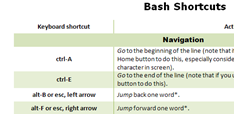 During my day-to-day activities, I use the Bash shell a lot. My #1 policy is to optimize the most frequently used activities as much as possible, so I’ve compiled these handy bash shortcuts and hints (tested in SecureCRT on Windows and Konsole on Linux). The article only touches on the default bash mode – emacs, not vi. If you haven’t specifically assigned your shell mode to vi (set –o vi), you’re almost certainly using the emacs mode. Learn these and your shell productivity will skyrocket, I guarantee it.
…
Hadoop Primer – Yet Another Hadoop Introduction
 I just came upon a pretty good Hadoop introduction paper posted on Sun’s wiki. Apache Hadoop is a free Java software framework that supports data intensive distributed applications. It enables applications to work with thousands of nodes and petabytes of data. Hadoop was inspired by Google's MapReduce and Google File System (GFS) (wikipedia). I wouldn’t call it an alternative to mysql – they’re in completely different weight categories. I like to think of Hadoop as a complement – I think it’s closer to memcached in its functions than to mysql. Perhaps a hybrid of both but a unique beast nonetheless. If you’re serious about scaling, you owe it to yourself to start exploring Hadoop yesterday.
A couple of …
MySQL Slave Lag (Delay) Explained And 7 Ways To Battle It
Updated: September 16th, 2012
 Slave delay can be a nightmare. I battle it every day and know plenty of people who curse the serialization problem of replication. For those who are not familiar with it, replication on MySQL slaves runs commands in series – one by one, while the master may run them in parallel. This fact usually causes bottlenecks. Consider these 2 examples:
- Between 1 and 100 UPDATE queries are constantly running on the master in parallel. If the slave IO is only fast enough to handle 50 of them without lagging, as soon as 51 start running, the slaves starts to lag.
- A more common problem is when one query takes an hour to run (let's say, it's an UPDATE with a
…
Updated: September 5th, 2008
So Google Chrome – Google's attempt at an open source browser, came out yesterday and I took it out for a spin. At its heart is the Webkit engine (also open source) and Google Gears, powered by SQLite (can MySQL rival SQLite in applications like this?). Here are my thoughts.
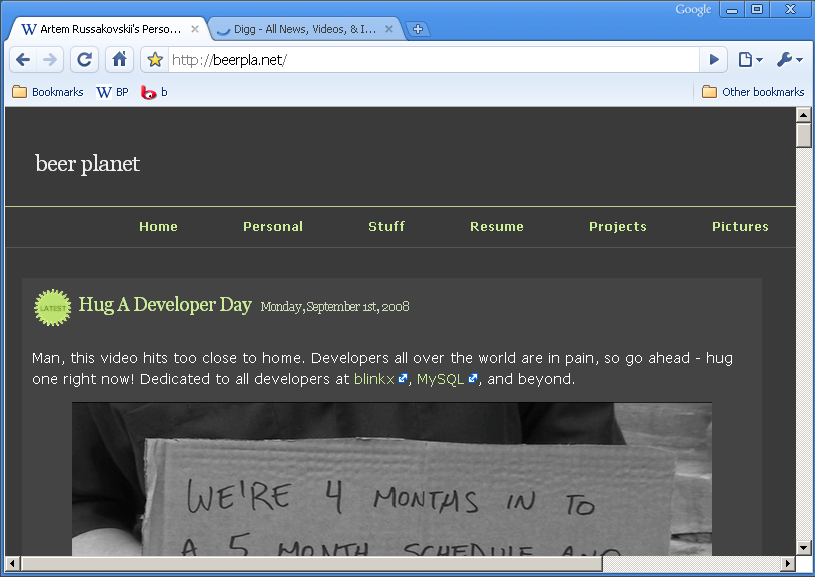
- Fast – Chrome loads extremely fast, blazing even. Granted, my Firefox would probably load fast if I didn't have any addons as well. Sites like Amazon or Digg load very fast. New tabs open instantly.
- Slow – http://www.blinkx.com/videos/channel:itn, seems like the combination of flash and html (or JS) on one page makes scrolling and redrawing quite slow.
- Very fluid design – I love how the tabs flow around
…
Moving From Perl 5 to Perl 6 – What's New, Tutorial Style
Updated: August 28th, 2008
 Newsflash: Perl 6 is not dead (in case you thought it was)!
I stumbled upon this most excellent series of posts by Moritz Lenz of perlgeek.de that describe the differences between Perl 5 and the upcoming Perl 6 (thanks to Andy Lester for the link). The posts are done in the form of tutorials, which helps comprehension. Simply awesome, Moritz.
It seems like Perl 6 is going to be a lot more object oriented, but such orientation is optional and not forced upon programmers, like in, say, Java. It warms my heart that I will be able to do this (you did see the new "say" function in Perl 5.10, right?):
 beer planet is a blog about technology, programming, computers, and geek life. It is run by Artem Russakovskii - a local San Francisco geek who is currently pursuing his own projects and regularly enjoys hacking Android, PHP, CSS, Javascript, AJAX, Perl, and regular expressions, working on Wordpress plugins and tools, tweaking MySQL queries and server settings, administering Linux machines, blogging, learning new things, and other geeky stuff.


