How To Find Out The Number Of Videos On Youtube
Updated: September 16th, 2012
 According to Wikipedia, in April 2008, the number of videos on Youtube was 83.4 million (ref: http://en.wikipedia.org/wiki/YouTube#cite_note-5). However, the link in the cite note now displays “*” video results 1 – 20 of millions, without showing the real count.
Here's one way I found to get an estimated, but relatively accurate, number of videos on the popular video sharing site Youtube. The idea is simple. Get this feed: http://gdata.youtube.com/feeds/api/videos/-/* and parse out the number inside the <opensearch:totalresults> tag.
So here it is: the number of videos on Youtube is currently fluctuating between about 141 million and 144 million. The number goes up and down, which points to the fact that these are estimates.
That's a whole boatload …
Top 10 Reasons Why Digsby ROCKS
Updated: August 20th, 2009
If you haven't heard of Digsby yet, you have probably been living in some kind of a virtual cave or have no friends. Digsby is a multi-network instant messenger application, similar to Trillian, Pidgin (GAIM), or Miranda. I said 'similar', so what makes Digsy special? Reviews I read so far don't give the real reasons and don't dive into the features in depth. Instead, you get a standard load of marketing BS and in the end to you, the user, Digsby may end up being "yet another IM program." Some reviews describe certain features, but so far I haven't seen one that highlighted THE MAIN REASON why Digsby is different. And may I preface it with: finally somebody got a …
Updated: January 4th, 2009
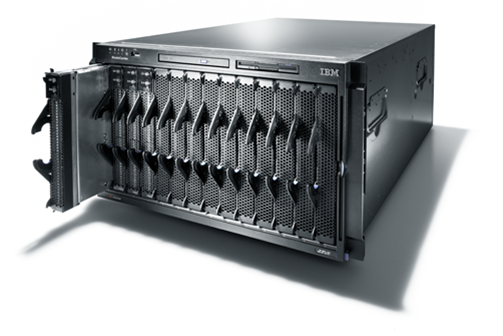 I want to get opinions from outside of my daily circle of people on the best server hardware to use for MySQL. I remember from the conference somebody (Pipes?) mentioning a particular Dell server with multiple disk RAID10 that could supposedly be had for about $6k but I completely misplaced the model number (Frank, did you get my email?).
I know that a multi-disk RAID array with a bunch of fast disks (15k RPM?) is probably the most important method of improving performance, followed by the amount of RAM, so I'm trying to find the best combination/balance of the two. However, server prices on the Internet range so much that I don't even know where to begin to tell a …
Google Phone (Android) Demo Of Streetview With Compass
Updated: June 1st, 2008
I think this is going to be really neat: you walk around the streets of San Francisco, for example, with your Android powered phone, en route to your destination 20 blocks away.
You whip out your phone, go to Google Maps, pull up the StreetView (remember this?), which zeroes in on your location using a built-in GPS, and then changes as you move the phone around using the built-in compass.
You then virtually walk the city, looking around, without actually moving an inch (looking for the closest ATM, restaurant, etc, hint-hint?).
Without further ado, let's have a look at this video from Google's I/O Conference for a demonstration?
Updated: June 1st, 2008
Recently I ran into major problems using GNU diff. It would crash with "diff: memory exhausted" after only a few minutes trying to process the differences between a couple 4.5GB files. Even a beefy box with 9GB of RAM would run out of it in minutes.
There is a different solution, however, that is not dependent on file sizes. Enter rdiff – rsync's backbone. You can read about it here: http://en.wikipedia.org/wiki/Rsync (search for rdiff).
The upsides of rdiff are:
 One thing that still springs to mind when I think of the MySQL User Conference last week is Sun's opening keynote. While talking about Sun's market penetration with open source software, Jonathan Schwartz, Sun's CEO, slipped in a short mention of the mobile market saying something along the lines of "Sun is going to be entering the mobile market later on this year". He didn't spend more than 5 seconds talking about it, moving on to the acquisition of MySQL.
Last year, Sun already made an announcement of JavaFX, a Java-based mobile platform but didn't provide any concrete timelines, so I was excited to hear the more on the subject. With Apple iPhone's advent last year and …
MySQL Conference Liveblogging: Optimizing MySQL For High Volume Data Logging Applications (Thursday 2:50PM)
- http://en.oreilly.com/mysql2008/public/schedule/detail/874
- presented by Charles Lee of Hyperic
- Hyperic has the best performance with MySQL out of MySQL, Oracle, and Postgres in their application
- I suddenly remember hyperic was highly recommended above nagios in MySQL Conference Liveblogging: Monitoring Tools (Wednesday 5:15PM)
- performance bottleneck
- the database
- CPU
- memory
- disk latency
- network latency
- 300 platforms (300 remote agents collecting data)
- 2,100 servers
- 21,000 services (10 services per server), sounds feasible
- 468,000 metrics (20 metrics per service)
- 28,800,000 metric data rows per day
- larger deployments have a lot more of these (sounds crazy)
- measurement_id
- timestamp
- value
- primary key (timestamp, measurement_id)
MySQL Conference Liveblogging: MySQL Hidden Treasures (Thursday 11:55PM)
- Damien Seguy of Nexen Services presents
- easiest session of all (phew, that's a relief)
- clever SQL recipes
- tweaking SQL queries
- shows an example where SELECT is ORDERED by a column that is actually an enum.
- an enum is both a string and a number
- sorted by number
- displayed as string
- can be sorted by string if it's cast as string
- compacts storage
- faster to search
- if (var)char is turned into enum, some space can be saved, shows example
MySQL Conference Liveblogging: Monitoring Tools (Wednesday 5:15PM)
Updated: April 18th, 2008
- Tom Hanlon of MySQL presents
- monitoring tool basics
- SHOW FULL PROCESSLIST
- SHOW GLOBAL STATUS
- SHOW GLOBAL VARIABLES
- basic tools
- mysqladmin is provided with the server
- mysqladmin -i 10 extended status: will repeat the same command every 10 seconds. Pipe through grep "and smoke it" (bad pun, hah hah)
- -r: show only changed values
- MySQL Administrator
- mysqladmin is provided with the server
- cacti
- rrdtool based network graphing tool
- uses snmp
- PHP apache and MySQL based solution
- MySQL plugins, download and install
- "poller" gathers data and populates the graphs
- someone offers munin as an alternative
- not snmp based, its own agent is used
- pros
- cacti is fairly easy to configure
- cons
- could be CPU intensive with lots of machines (Perl polling seems to be the
…
MySQL Conference Liveblogging: Benchmarking Tools (Wednesday 4:25PM)
- Tom Hanlon of MySQL presents
- Benchmarking tools
- mysqlslap (with MySQL 5.1)
- sql-bench
- supersmack – Jeremy Zawodny's tool
- Apache Bench (combined with some sample PHP scripts)
- MySQL's benchmark() function
- mybench
- WAST
- JMeter
- sql-bench
- pros
- ubiquitous
- long history of use
- cons
- single thread
- Perl
- not always real-life test cases (create 10k tables?)
- list of tests follows
- pros
- supersmack
- configurable, flexible
- 1000 queries, 50 users
- super-smack -d mysql select-key-smack 50 1000
- can modify queries to be closer to what your own application uses
- pros
- benches concurrent connections
- well documented
- cons
- test language sucks
- Apache Bench
- webserver benchmarking tool
- point to a webserver, utilizes concurrent users
- siege, httperf, httpload are similar
- 404 errors deliver really quickly, so make sure to check for those
- benchmark()
- tests
…
MySQL – Sun – Flickr – Fotolog – Wikipedia – Facebook – YouTube Comparison – MySQL Conference Day 2 Keynote
Updated: April 24th, 2008
Unfortunately I didn't find any available seats to take notes for this but this morning a very interesting keynote took place. Representatives from 7 large companies mentioned in the title gathered on stage and answered various questions by MySQL's Kaj Arno.
These questions included things like "how many MySQL servers do you have", "how many DBAs", etc. It was a lot of fun, hopefully someone (Sheeri) will edit and post the video soon.
Keith has a nice summary of everything that went on together with the numbers here.
Update: Venu has even better notes here….
MySQL Conference Liveblogging: Introduction To The BLOB Streaming Project (Wednesday 3:00PM)
- Paul McCullagh presents
- BLOB
- invented by Jim Starkey
- Basic Large OBject
- Binary Large OBject
- photos, films, mp4 files, pdfs, etc
- mysql client send buffer -> receive buffer on the server (max_allowed_packet)
- streaming a BLOB
- continuous data stream
- stream BLOB data directly in and out of the database
- store BLOBs of any size (>4GB) in the database
- create a scalable back-end that can handle any throughput and storage requirements. Wouldn't need to know in advance how big the database will get
- provide an open system that can be used by all engines
- provide extensions for BLOB streaming to existing MySQL clients
MySQL Conference Liveblogging: MySQL Performance Under A Microscope: The Tobias And Jay Show (Wednesday 2:00PM)
- Jay Pipes, Tobias Asplund
- Finding out the number of rows that would have been returned (MyISAM and InnoDB)
- SQL_CALC_FOUND_ROWS and FOUND_ROWS()
- COUNT(*)
- MEMORY table
- if query cache is on, then it makes no difference
- if it's off
- Memory MyISAM is fastest
- FOUND_ROWS() is slightly slower than count(*)
- SELECT … WHERE a UNION SELECT … WHERE b
vs
SELECT … WHERE a AND b - index_merge wins
- composite index is faster
- of course, multiple indexes are more flexible than composite index
- …
MySQL Conference Liveblogging: Applied Partitioning And Scaling your (OLTP) Database System (Wednesday 11:55AM)
- Phil Hilderbrand of thePlatform for Media, Inc presents
- classic partitioning
- old school – union in the archive tables
- auto partitioning and partition pruning
- great for data warehousing
- query performance improved
- maintenance is clearly improved
- often id driven access vs date driven access
- 1 big clients could be 80% of the whole database, so there's a difficulty selecting partitioning schemes
- reducing seek and scan set sizes
- improving inserts/updates durations
- making maintenance easier
MySQL Conference Liveblogging: Portable Scale-out Benchmarks For MySQL (Wednesday 10:50AM)
- Robert Hodges from Continuent presents
- About Continuent
- leading provider of open source database availability and scaling solutions
- uni/cluster – multi-master database clustering that replicates data across multiple databases and load balances reads
- uses "database virtualization"
- protection from db and site failures
- continuous operation during upgrades
- Brewer's conjecture
- DDL support
- inconsistent reads between replicas
- deadlocks
- sequences
- non-deterministic SQL
- data replication
- where are updates processed? master/master vs master/slave
- when are updates replicated? sync vs async
 beer planet is a blog about technology, programming, computers, and geek life. It is run by Artem Russakovskii - a local San Francisco geek who is currently pursuing his own projects and regularly enjoys hacking Android, PHP, CSS, Javascript, AJAX, Perl, and regular expressions, working on Wordpress plugins and tools, tweaking MySQL queries and server settings, administering Linux machines, blogging, learning new things, and other geeky stuff.


