5
How To Show Hidden/Invisible Files In Total Commander, Both Locally And On An FTP Server
Posted by Artem Russakovskii on March 6th, 2010 in Tips
 Today I have 2 tips for Total Commander users:
- how to display hidden local directories and files and
- how to display hidden FTP directories and files
Really, Total Commander should just control this setting in one place but, unfortunately, it is not the case.
I usually prefer when my file manager shows me everything I have, so that I can be more in control and see the hidden directories, such as .svn or $Recycle.Bin, and files, such as .bashrc or pagefile.sys.
How To Display Hidden Local Directories And Files
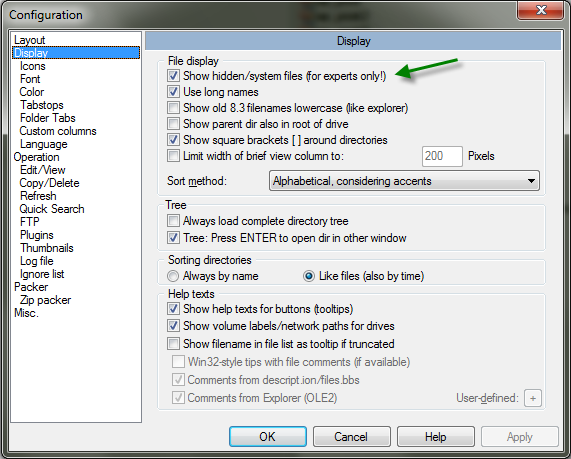
- go to Configuration -> Options… -> Display
- put a check next to the "Show hidden/system files (for experts only)"
How To Display Hidden FTP Directories And Files
This one is a …
Read the rest of this article »
 beer planet is a blog about technology, programming, computers, and geek life. It is run by Artem Russakovskii - a local San Francisco geek who is currently pursuing his own projects and regularly enjoys hacking Android, PHP, CSS, Javascript, AJAX, Perl, and regular expressions, working on Wordpress plugins and tools, tweaking MySQL queries and server settings, administering Linux machines, blogging, learning new things, and other geeky stuff.


