http://forge.mysql.com/w/images/1/1e/Dolphin_Laptop_cropped-386x222.jpgSlave delay can be a nightmare. I battle it every day and know plenty of people who curse the serialization problem of replication. For those who are not familiar with it, replication on MySQL slaves runs commands in series - one by one, while the master may run them in parallel. This fact usually causes bottlenecks. Consider these 2 examples:

  • Between 1 and 100 UPDATE queries are constantly running on the master in parallel. If the slave IO is only fast enough to handle 50 of them without lagging, as soon as 51 start running, the slaves starts to lag.
  • A more common problem is when one query takes an hour to run (let's say, it's an UPDATE with a big WHERE clause that doesn't use an index). In this case, the query runs on the master for an hour, which isn't a big problem because it doesn't block other queries. However, when the query moves over to the slaves, all of them start to lag because it plugs up the single replication thread.

Sidenote: when I hear an argument that a master has to be the most powerful machine in the group, I cringe at the logic. If the master can crunch more INSERTs/UPDATEs after an upgrade to a better machine, then replication will fall behind even faster.

There is nothing you can do right now to fix the way MySQL handles replication. If the replication threads could run in parallel, I'm guessing horrible things would happen to the data integrity due to race conditions, canceled queries, slave restarts, differences in query execution times due to server load and configuration, etc. Replication is already an asynchronous, prone to getting out of sync business (hint: use maatkit tools by Baron Schwartz and specifically mk-table-checksum and mk-table-sync to sync up your slaves).

In order to see if a slave is lagging, execute the 'show slave status' command and look for the Seconds_Behind_Master value. The way this value is calculated can be slightly ambiguous and unclear, so I'll explain. It is simply a difference between the 2 timestamps - the time of the last received (and queued up in the relay log) query that already executed on the master and the time of the currently executing query on the slave. Thus this value is not real time (it is possible to catch up to the master much faster); it's an approximation, or special metrics if you will, that helps point out problems.

So what can you do if you start hitting replication lag? This is the ultimate question, and the answer depends on your application. Here are the things I came up with after dealing with MySQL for a few years (there are undoubtedly other techniques, but these all come from my own experience):

  1. Normalize your data, if it is not already. Non-normalized tables lead to repetition and is generally considered bad practice. More data - more IO in most cases. There can be cases, however, where you can normalize too much. Having JOINs is much slower than not having them, and it can hurt your queries if you JOIN a lot. Finally, the extreme case is mentioned at highscalability.com: How I Learned to Stop Worrying and Love Using a Lot of Disk Space to Scale. "You–pause for dramatic effect–duplicate data instead of normalize it. *shudder*". Flickr is provided as an example.
  2. Shard (meaning, slice) your data, horizontally and vertically. For example, you can horizontally partition by some sort of key, hash, username, or other properties. You can also partition vertically by moving out some table columns into other databases. As an example, if you had a database of videos, storing view counts, number of favorites, etc. is OK but if these fields receive a lot of frequent updates, you are bound to have slave lag. Instead, separate these into a dedicated stats table(s). You don't have to shard all of your data - even sharding the most active bits helps immensely (for example, you can choose to shard your stats tables and leave the main one alone).
  3. Upgrade machines running MySQL (first slaves, then master, for the reasons given above). 99% of the time, disk IO is the bottleneck, CPU being the other 1%. Move to RAIDed setups (RAID10 or RAID0) with 6-10 15K RPM SCSI or SSD drives. Add a lot of RAM. Make sure you're running a 64 bit OS if you have more than 3GB of RAM, so that the mysql process may utilize more of it. My search for the best MySQL server under $10K may be of some help here.
  4. Separate your applications onto different MySQL instances. If you are running separate applications A, B, and C that don't depend on each other, consider giving them their own machines, otherwise a single long-running UPDATE or INSERT query in application A will delay all writes by application B and C. This is actually quite common - even though the server may not appear to be loaded, the annoying slave delay will still show its cowardly tail. I want to highlight this again: the replication thread is shared between all databases on the server.
  5. Another solution to (4) is multiple MySQL instances, granted that the MySQL machine isn't generally overloaded already. In that case, installing more than 1 mysql daemons would separate replication threads and allow running multiple applications, like A, B, and C on one machine, without affecting each other. MySQL sandbox achieves just that - it is my preferred solution.
  6. Split up longer running queries into shorter ones. This should be pretty straightforward - a single query on 10 million rows may run a few hours. Splitting it into batches of 50,000, for example, will give other queries a chance to run in between. Of course, you should take care of data integrity and generally double check what you are doing.
  7. Don't overload the same slave by sending all queries to it, as it will just make the matter worse. You can round-robin the queries using either round-robin DNS (eww), round-robin within the application logic (better), smarter application logic, like checking slave load and status from time to time, or my personal favorite - using MySQL proxy and having it pick the least lagging slave for you. An official solution utilizing mysql proxy, called MySQL load balancer, is apparently in the works (I was promised beta access but haven't got it so far).

As a bonus, I wanted to throw in this idea of helping minimize a certain corner case cause of slave delay and feed it to the hungry MySQL minds. I'm not sure if it is mentioned anywhere else, as I have not Googled it. If it's a widely known fact, then I will consider this post as just adding my vote to the usefulness of the technique.

Here goes: if you have replication setups that use a lot of INSERT commands and you expect that most of such INSERTs would dupe with existing data (and you are using INSERT IGNORE, not REPLACE), consider replacing such queries with SELECTs, followed by only necessary INSERTs. The reasoning is simple: INSERTs propagate to all the slaves and have to run on a master. SELECTs can run on any slave and don't propagate anywhere, so if only 0.01% of the queries result in new rows, this technique will get rid of a lot of unnecessary slave query traffic.

Well, there you have it. Comments are open, so feel free to share your own replication strategies and thoughts about mine.

Thoughts on Google Chrome

Wednesday, September 3rd, 2008

Updated: September 5th, 2008

So Google Chrome - Google's attempt at an open source browser, came out yesterday and I took it out for a spin. At its heart is the Webkit engine (also open source) and Google Gears, powered by SQLite (can MySQL rival SQLite in applications like this?). Here are my thoughts.
image

  • Fast - Chrome loads extremely fast, blazing even. Granted, my Firefox would probably load fast if I didn't have any addons as well. Sites like Amazon or Digg load very fast. New tabs open instantly.
  • Slow - http://www.blinkx.com/videos/channel:itn, seems like the combination of flash and html (or JS) on one page makes scrolling and redrawing quite slow.
  • Very fluid design - I love how the tabs flow around when you drag them or make them pop in or out, I love how fluid animation and resizing is.
  • Internal task manager - an absolutely brilliant idea. Since each tab and plugin get their own process, they don't affect each other. Any freezes are isolated to the process itself, so the days of hung browsers because of some buggy javascript should be gone gone (I'll actually have to see how well it works first).

image

  • Great Google search integration and overall Firefox3-like url bar behavior.
  • The word search functionality is amazing - best out of all browsers. It's incredibly fast, even on large pages, highlights all the matches, with the current one in orange, and more importantly, gives count (finally!). The search popup complements the fluidity perfectly.

image

  • History - looks great and has a timeline style. It's like reading a journal.
image
  • View Source - again, best in class. Highlighting and line numbers by default. Url access style: view-source:http://digg.com. Search spread highlighting on the right. It's close to perfect, without using any plugins.

image

  • My bookmarks, where art though? Where's the bookmarks menu? I know the homepage has them, and there's a pretty hidden way to make the bookmarks bar appear all the time (right click on it while on the home page and check 'Always show bookmarks bar' but that's not what I want. I like placing many-many bookmarks named with 1 or 2 letters onto the bookmarks bar (I found a way to emulate the behavior in the screenshot below). How can I create duplicates of the same bookmark in different places? It seems you can only bookmark in one. The interface to get around managing the bookmarks isn't well thought out, you can get to certain places only the certain way. How do you export/import bookmarks after the initial installation (I chose to skip mine)? Edit: Apparently, you can't yet.

image

  • The homepage button is missing (though it can be enabled by Options->Show Home button on the toolbar). Why is it not on by default?

image

  • I also enabled the following option right away (the main reason I use TabMix Plus for Firefox):

image

  • Scrolling is very choppy and goes in huge jumps on my laptop (not the case in Firefox).
  • Status bar - why do you disappear automatically when I get close to you? You can be so useful and display so much useful info? Stop disappearing!
  • What with the Vista-style buttons? I have Win2k menus, which I find a lot simpler and easier on the eye. Why not inherit the window style?

image

  • No Linux support. Hopefully coming soon.

image

  • No addons supported or announced yet.


In conclusion, I understand the browser is very new and will probably go through many facelifts, UI changes, bug fixes, and enhancements but it has a lot to cover and if it's going to try to rival the giants, it better fix some things fast. I personally won't start using it until some addons start showing up, like the AI Roboform (AI Roboform has actually responded to this guy about such addon possibility) and Adblock Plus ones. However, for occasional browsing, it's great. Give it a spin.

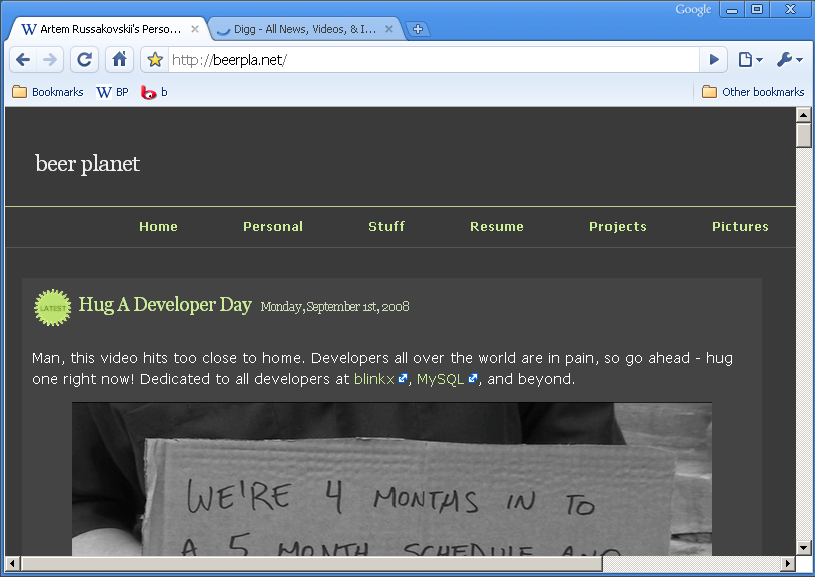
Hug A Developer Day

Monday, September 1st, 2008

Man, this video hits too close to home. Developers all over the world are in pain, so go ahead - hug one right now! Dedicated to all developers at blinkx, MySQL, and beyond.