Basement hackers compete to best Netflix recommendations $1M
Sunday, November 30th, 2008
This is a great read by NY Times. An article on 6 pages rarely gets my full attention but this is one of them (though I detest the usage of "basement hacker").
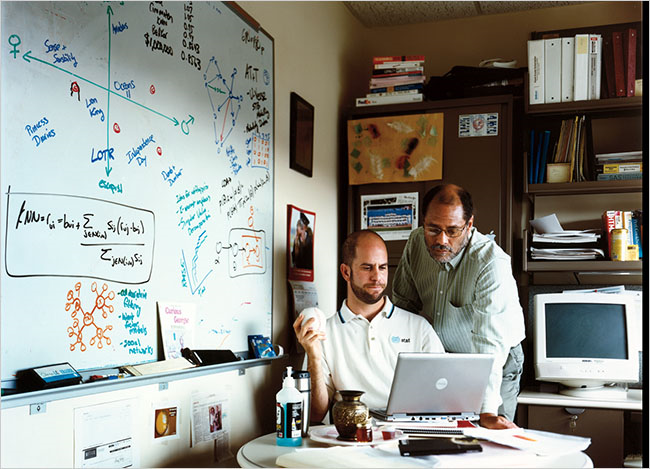
Basement hackers and amateur mathematicians are competing to improve the program that Netflix uses to recommend DVDs — and to win $1 million in the process.
"THE “NAPOLEON DYNAMITE” problem is driving Len Bertoni crazy. Bertoni is a 51-year-old “semiretired” computer scientist who lives an hour outside Pittsburgh. In the spring of 2007, his sister-in-law e-mailed him an intriguing bit of news: Netflix, the Web-based DVD-rental company, was holding a contest to try to improve Cinematch, its “recommendation engine.” The prize: $1 million.
Cinematch is the bit of software embedded in the Netflix Web site that analyzes each customer’s movie-viewing habits and recommends other movies that the customer might enjoy. (Did you like the legal thriller “The Firm”? Well, maybe you’d like “Michael Clayton.” Or perhaps “A Few Good Men.”) The Netflix Prize goes to anyone who can make Cinematch’s predictions 10 percent more accurate. One million dollars might sound like an awfully big prize for such a small improvement. But in fact, Netflix’s founders tried for years to improve Cinematch, with only incremental results, and they knew that a 10 percent bump would be a challenge for even the most deft programmer. They also knew that, as Reed Hastings, the chief executive of Netflix, told me recently, “getting to 10 percent would certainly be worth well in excess of $1 million” to the company. The competition was announced in October 2006, and no one has won yet, though 30,000 hackers worldwide are hard at work on the problem. Each day, teams submit their updated solutions to the Netflix Prize Web page, and Netflix instantly calculates how much better than Cinematch they are. (There’s even a live “leader board” ranking the top contestants.)
In March 2007, Bertoni decided he wanted to give it a crack. So…"
Photo and article copyright of NY Times.
Got IM Spam?
Monday, November 24th, 2008
Everyone hates spam, right? Right, well maybe except for security researchers – it pays their bills. But the rest of the sane world does, and so do I, and while gmail has figured out a way to deal with the problem 99.9% of the time, nobody invented instant messenger anti-spam solutions yet [I think].
Lately I have been getting increasingly annoyed with a certain unexplainable, persistent, and surprisingly intelligent botnet on AIM. From time to time I would get messages from some sort of a fish variation. My list so far consists of the following IM names: CroppedCoho, FortifiedTrout, FreshenedupTrout, FrozenSolidTrout, HandcuffedCoho, KissableCoho, PreferentialCoho, SmarterCoho, TentativeCoho, WantedCoho, and YoinkedTrout. Does it look annoying already? Well, it is.
Each of the conversations would start out casually, the bot would respond quite wittily and intelligently, and the whole conversation would eventually either lead to me getting pissed off or the bot promoting reddit in one way or another. What is reddit’s affiliation with this botnet? I’d like to know myself.
Here’s an example of one conversation:
(1:15:12 AM) frenchcoho Ever watched a marmot bite a lamb to death while blindfolded? No? Well, you're sure in for a treat!
(1:15:36 AM) archon810 let me guess
(1:15:37 AM) archon810 trout?
(1:15:50 AM) frenchcoho i think so.
(1:16:06 AM) archon810 #reddit?
(1:16:33 AM) frenchcoho what about it?
(1:16:41 AM) archon810 it's gay
(1:16:44 AM) archon810 like you
(1:16:53 AM) frenchcoho …good one?
(1:16:57 AM) frenchcoho you sure got me.
(1:17:14 AM) archon810 run along now
(1:17:28 AM) frenchcoho okay?
<blocked>
or
(8:51:25 PM) smartercoho Ever watched a marmot bite a lamb to death while blindfolded? No? Well, you're sure in for a treat!
(8:51:35 PM) archon810 fuck off
(8:51:37 PM) archon810 i hate you
(8:51:44 PM) smartercoho You don't even know me
<blocked>
or just blatantly frank:
(7:13:13) yoinkedtrout We're discussing Trout in the IRC channel #reddit on irc.freenode.org.
<blocked>
At this point I had enough. Sure – it was all very mysterious but at the same time incredibly annoying. A few seconds of googling led me to this page, with instructions of how to stop the nonsense and a Wikipedia link that finally shone some light on the puzzle.
(9:51:18 AM) handcuffedcoho Hey, let's be friends.
(9:54:29 AM) archon810 $optout
(9:54:32 AM) handcuffedcoho OPERATOR: Are you sure you want to opt-out? If you do, you will *never* be contacted again on the account "Archon810". There is *no way* to opt back in and undo this.If you are sure, type "$optout 35DA". Remember, this is permanent and irreversible!
(9:54:44 AM) archon810 $optout 35DA
(9:54:44 AM) handcuffedcoho OPERATOR: You have opted out. The account "Archon810" will *never* be contacted again. Good bye!
Phew, and it’s over. I hope… Probably until the next smartass decides to code up a new bot variant.
Jocko Sims’ (Panic’s) Rap On Starz Show Crash (MP3)
Sunday, November 16th, 2008
Updated: December 13th, 2008
Crash is one of the new shows I’m into and Panic is one of the most likeable and original characters on the show. I really think he’s going to be back after this show – it’s his breakthrough performance.
So, in, I think, episode 4 Panic (Jocko’s character) goes to the studio and raps for the first time. What comes out is quite amazing, I recommend you watch that episode for a more complete experience. Otherwise, proceed to the MP3 that I got directly off Jocko’s myspace page.
You can play it right on this page (Edit: download link removed, per Jocko's request in the comments) or support Jocko by buying his album off Amazon for only $0.99 (see link below). I know it's really not my kind of music but I can appreciate good lyrics and execution. Enjoy.
Here's a streaming version:
Buy Jocko's song on Amazon:

Edit: I found a video. Fast forward to 3:55.
Building The Perfect HTPC (Media PC), Capable Of Playing 1080P H264
Saturday, November 8th, 2008
Updated: January 4th, 2009
The Idea
For the past month I have been exploring options and building a perfect Home Theater PC for my 50” Vizio plasma. Besides the obvious, it has to play movies, youtube videos, etc, I had a few concrete goals in mind. Here they are:
- it absolutely had to handle 1080P h264, specifically movies encoded using x264. An average movie size for this format is between 8.5 and 13 GB. There were 2 problems to overcome: the CPU had to be able to handle the decoding (my desktop dual core Conroe barely kept up) and the network had to be fast enough to stream in real time from my storage PC a floor away.
- I needed to have the easiest control over the whole thing. VNC wasn’t good enough, because I don’t always have a laptop lying around.
- It had to support 7.1 sound.
- It had to have excellent picture quality on the TV, preferably during both movies and regular browsing/reading, etc. HDMI/DVI was optional, depending on how good the analog quality was.
- It had to be as cheap as possible but still good enough to do the job really well.
- It had to have a serial port (most micro ATX motherboards nowadays do not, which is upsetting).
- It had to look slick and unconventional – unlike a regular PC.
Setup
After lots of research, I used the following components from the following sources (best deals I could find):
- Intel Pentium Dual-Core E2200 Processor, 2.2 GHz, $79.99, no tax, and free shipping. I decided to go for a relatively cheap but still very powerful CPU and the results exceeded my expectations. More below.
- ASUS P5KPL-CM LGA 775 Intel G31 Micro ATX Intel Motherboard, $52.99 + tax + $8.97 shipping. Also available on Amazon. It has on-board 7.1 sound, 2 PCI slots, and a serial port (for my good old Packard Bell serial remote control). No HDMI/DVI and no onboard RAID but I didn’t need those.
- OCZ SLI-Ready 2GB (2 x 1GB) 240-Pin DDR2 SDRAM DDR2 800 (PC2 6400) Dual Channel Kit Memory (OCZ2N800SR2GK). $43.99 + tax, free shippping - $25 rebate. Also available on Amazon.
- Antec New Solution Series NSK2480 Case, $107.99, no tax + $17.82 shipping - $8 coupon (code: TAKER). Even cheaper on Amazon. The case already comes with a 380W power supply, so I didn’t need to buy a separate one. It provides plenty of power for the HTPC. Also, there’s a lot of space inside for ventilation, and I didn’t get a crammed feeling when installing my components. Ventilation is a separate point I’d like to highlight with this case, as it came with 2 120mm fans and 2 extra ones just in case. The lowest of 3 speed settings has worked great for me.
- DSI 2.4GHz Wireless Keyboard with Optical trackball, Black, FK-760, $52.99, no tax, and free shipping. Inspired by the famous mysql geek Jeremy Zawodny here and here.
- the keyboard you can see pictured below can be branded by DSI, Adesso, and other companies but it’s the same thing, so there’s no point trying out the Adesso one if the DSI didn’t work well for you.
- the DSI/whatevercloneofit fit my needs best, after comparing it to Logitech diNovo Mini and the full size diNovo version, Microsoft, and others.
- the price of ~$50 is simply unbeatable.
- the trackball mouse is probably the best for a keyboard of this type. I tried the touchpad on the diNovo and it was crap.
- the left mouse trigger button located on the right side under the keyboard as well as the left/right mouse buttons on the left side of the keyboard are exactly what I wanted from the usability point of view. I can hold the keyboard with either hand and still click like a champ.
However, Charger2000’s suggestion to buy a USB extension cord (I bought this one from monoprice.com) and use it to raise the keyboard receiver to about 5 feet off the ground worked like a charm and I am finally very happy.
- Airlink AWLH6080 300N Wireless-N & G PCI Adapter for Desktops, $44.99 + tax, no shipping as I picked it up at a local Fry’s. I needed to start experimenting with 802.11N because I didn’t want a swarm of network cables laying around. More on this later but I can tell you it’s great. Also available on Amazon.
- Airlink AR680W 300N Wireless-N & G Router, I think about $50 + tax at Fry’s. Also available on Amazon.
- Logitech Z-5500 505W 5.1 Speakers, on sale at Dell for $170 a few months ago. Also available on Amazon.
- Some old 60GB hard drive. I’m planning on streaming most things, so it’s not worth spending any money on this item. You can pick a 1TB Seagate drive on Amazon for about $100.
- Windows XP (for now)
Verdict
The final product exceeded my expectations. Not only did it play 1080P h264 perfectly, it didn’t even need a separate graphics card to take over the load. The CPU usage is about 35-40% when playing 720P and 40-50% when playing 1080P. No need for DVI or HDMI input – the standard VGA connector is very crisp and provides much better fine print and detail than HDMI. I can read and browse small font without any problems. The sound is superb as well, after all the tweaking, so no additional sound or video cards were needed. Using the wireless ultra light keyboard as well as the remote, I am now able to control everything on the screen with ease.
Temperatures, ventilation, cooling. The case provides excellent ventilation, as I already mentioned. The CPU idles at about 30C and goes to 45-48C when playing the highest quality 1080P HD video I could find. In short, the case is cool and quiet.
Wireless (802.11N). After playing around with the 802.11N (or at least Airlink101’s implementation), I have to say I’m quite impressed. I get speeds of between 3 and 5 MB/s (Megabytes per second) and all 720P and most 1080P content streams live. Some really hi-res 1080P movies require to be downloaded first, which confuses me. During streaming, instead of using 4-5 MB/s, VLC (or MPC, or any other player I’ve tried) uses only about 1-2 MB/s and starts lagging. I don’t yet have a workaround for the player to utilize 100% of my bandwidth and stop lagging. Do you?
One thing I really hated about Airlink101 is their software (the firmware seems great so far). It’s the most basic piece of crap software accompanying hardware I’ve ever seen. Absolutely no thought and effort went into it – I believe it’s still on version 1.0 or 1.1. It’s so bad, even the Windows default wireless manager is better. The final straw was the absence of a setting to connect to preferred networks only. After I found my computer randomly connected to some open netgear network one day, I decided to not use Airlink101’s software for a long-long time, maybe ever.
The sound. ASUS’ onboard 7.1 HD audio delivers very decent sound. I’ve installed the latest drivers, enable virtual fill (so that 2 channel sound gets automatically distributed to all speakers), and hooked up the Logitech Z5500 5.1 and another Logitech 2.1 to form a pseudo 8.2 speaker system. This thing has thump!
A note on VNC: I ended up not using it as it was creating sync issues while playing video (vsync?). If I turn on VNC while playing a video (and even if I turn it off), the vsync issues are quite apparent. The wireless keyboard is a better solution anyway, so I am quite happy with it (though it could use larger operational range).
HTPC/Media Center Software. Network file sharing + file manager (Total Commander or any other) + media player classic have worked very well but I still wanted to find the perfect media center program for visually pleasing media experience. It turns out there are a few candidates. Here they are:
- XBMC – free, not bad at all, but it was too buggy and couldn’t find my network drives.
- Mediaportal – also free and also buggy. It couldn’t play a lot of video files.
- SageTV – not free. Worse than the 2 above. Absolutely no reason to pay for something this bad when free alternatives are available.
- MeediOS – free. Testing it out right now.
- Boxee – free, no Windows version yet but supposedly this is the best one of them all, at least looking at all the recommendation on the web. As soon as I get around to putting Linux onto this box, I’ll try boxee.
- Anything else major I’m missing?
So, as of this time, Total Commander and MPC are still my preferred method of watching videos. I don’t feel that any of the programs I’ve tried are ready for prime time yet.
Remaining work. I’d like to figure out how to wake up the machine on keyboard event. I don’t think it’s possible with the wireless keyboard like that, but I’m not 100% on that. I’d like to know how to stream videos utilizing full network capacity.
Here are some pictures of the final system:
And I couldn’t resist:

(No Ratings Yet)
beer planet is Artem Russakovskii's blog. Artem is a software engineer at