Having spent way more time on this problem than I really should have, I'm going to make sure everyone can actually find a solution instead of useless WordPress support threads.
The Problem
I wanted to export all the data from WordPress using its native export mechanism (located at http://YOURBLOG/wp-admin/export.php), but since the blog I was working on was pretty large (6k posts, 120k comments), I kept getting XML files that ended prematurely and for which xmllint spit out this error:
Premature end of data in tag channel
Upon closer inspection, I saw the XML file ended with a random, yet always fully closed, </item> tag, but was missing the closing </channel> and </rss> tags, as well as a whole …
One thing that's been continuously annoying me when doing WordPress development on the go is when something somewhere inside WordPress decides to send requests to external urls when I don't even have Internet connection or it's slow and flaky (tethering, slow Wi-Fi, etc). This results in random lag when loading pages, especially if I haven't opened my dev WordPress instance for a long time.
Turns out there's an easy and undocumented (other than in code) solution. To block external HTTP requests right in WordPress's core itself, open up wp-config.php and add WP_HTTP_BLOCK_EXTERNAL like so:
1 |
define('WP_HTTP_BLOCK_EXTERNAL', true); |
Whenever this variable is present, external requests will be ignored, unless you specify your own comma-separated whitelist …
How To Dynamically Increase Memory Limits When Interfacing With WordPress Using XML-RPC (Windows Live Writer, Etc)
Updated: August 27th, 2012
Today's snippet is tremendously helpful if you are using an XML-RPC WordPress interface to read and publish your articles and are running into 500 Server Error issues due to running out of memory, manifesting themselves in something like this error message: "Invalid Server Response – The response to the metaWeblog.newMediaObject method received from the weblog server was invalid".
For example, my regular PHP memory allocation is 32MB or so, but if I load up Windows Live Writer, my favorite publishing tool, and ask it to load 1000 of the latest blog posts, I will undoubtedly get a server error back.
One solution would be to increase the memory allocated to PHP to something higher, like 256MB, which is how …
Updated: February 2nd, 2011
WordPress has a great way of letting you use simple text tags called shortcodes to provide a whole bunch of functionality, including custom PHP code. In this article, I'm assuming that you already know what shortcodes do and how they operate (if you don't, head over here: Shortcode_API).
One glaring omission in the way shortcodes are set up by default is that they only get triggered in the content of your post, leaving the sidebar and comments out. I'm sure this is done for security, so that your readers can't screw something up by posting shortcodes they're not supposed to – after all, shortcodes are PHP snippets on the backend.
However, let's assume you really know what you're doing …
How To Diagnose And Fix Incorrect Post Comment Counts In WordPress
Updated: September 16th, 2012

Introduction
If your WordPress comment counts got messed up, whether because of a plugin (I'm talking about you, DISQUS) or you messed with your database manually and did something wrong (yup, that's what I just did), fear not – I have a solution for you.
But first, a little background.
Comment Counts In WordPress
Here's how comment counts work in WP:
- Posts live in a table called wp_posts and each has an ID.
- Comments reside in a table called wp_comments, each referring to an ID in wp_posts.
- However, to make queries faster, the comment count is also cached in the wp_posts table, rather than getting calculated on every page load.
If this count ever gets out of sync with
…
The Problem
If you use the Recent Comments sidebar widget in your WordPress installation, it's possible that you want to customize this widget's style.
You will quickly find, however, that as soon as you add the widget to your sidebar, it injects the following inline, hardcoded CSS into the containing page (using !important to make things worse):
<style type="text/css">.recentcomments a{display:inline !important;padding:0 !important;margin:0 !important;}</style> |
The code above comes from recent_comments_style() (found in wp-includes/default-widgets.php), which is in turn called by WP_Widget_Recent_Comments() in the same file (this is just an old-style PHP4 constructor – same as PHP5's __construct()), which is triggered when the Recent Comments widget is used:
WordPress Developers – How Do You Make A Living [Poll + Discussion]?
Updated: May 3rd, 2010
The Question
I'd like to pose this question to all WordPress developers – plugin, theme, as well as core ones:
How do you make your living?
And, for clarification, by this I mean: "what are your primary sources of income?"
Open Source
Open source is a beautiful concept but it often comes with a price tag or, rather, the inverse price tag: most of the time you are not being paid for your time (of course, there are exceptions, such as companies hiring dedicated open source developers and keeping them on their direct payroll).
Everyone has to make a living, however, and everyone has their ways.
Developers can benefit from such income sources as:
Follow-up To Loading CSS And JS Conditionally
First of all, I'd like to thank everyone who read and gave their 2 cents about the [Wordpress Plugin Development] How To Include CSS and JavaScript Conditionally And Only When Needed By The Posts post. The article was well received and will hopefully spark some optimizations around loading styles and scripts.
Here are some discussions and mentions around the web:
- an article on Weblog Tools Collection
- a forum post on WP Tavern
- twitter retweets
Sure, there are drawbacks to this method and it does require some more processing on the backend and it's not for everyone, which is why we should always strive for an even better solution.
I stand by my point of view that, for instance, my dedicated …
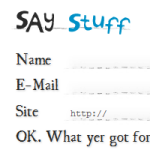
20 Inspirational And Original Comment Form Designs For Your Blog
Updated: January 25th, 2010
 Introduction
If you follow web design at all, you probably see 5 billion top NN posts on a daily basis mentioning site and blog designs, fonts, icons, etc.
However, nobody seems to be paying attention to these little but important guys: comment forms.
If you have an appealing comment box, you are more likely to receive comments (this is based on days of scientific research that I imagined I did in my head) and your content is more likely to be re-shared, voted up, and saved.
I really do feel that way when I visit blogs, especially when an otherwise aesthetically pleasing site has a plain vanilla comment box.
Let's Go
So here we go. I have looked through hundreds …
Updated: August 30th, 2014
Introduction
 In this tutorial, I am going to introduce a WordPress technique that I believe was unpublished until I raised the question a few days ago on the WordPress forums.
In short, the problem I was trying to solve was plugins unnecessarily loading their JavaScript and CSS on *every* page of the blog, even when doing so would achieve absolutely nothing and the plugin wouldn't do any work.
I briefly mentioned this approach here but Scribu decided to expand on …
Updated: January 16th, 2010
Introduction
I love Delicious. It allows me to store my bookmarks, tag and search them, and, best of all, have access to them from anywhere on the web.
Searching bookmarks by keyword is easy – just enter a bunch of keywords into the search page and off you go but what if you want to confine your results to a certain domain? The main reason I wanted to do it personally is so that I could see all pages of my site bookmarked by Delicious users and the corresponding number of bookmarks. However, the only url based search Delicious offered was a full url lookup:

This search is very limited – it accepts only a full url to …
How To Properly Set SVN svn:externals Property In SVN Command Line
Updated: October 6th, 2009
Introduction
Every time I have to deal with svn:externals in SVN, I forget the command line syntax. Every single damn time. Normally, I use SVN GUI clients, such as SmartSVN, which make it very simple to add an svn:externals property. But for command line, it always takes looking at 25 different sites on google, which are all incredibly unhelpful for this question for some reason. Trying "svn help propset" on the command line was bloated and equally useless.
So this time I needed to write it down and make sure everyone who needed help with svn:externals would find exactly what they need here. I hope this page will soon come up on top of all the unhelpful results on …
How To Make Your Site Lightning Fast* By Compressing (deflate/gzip) Your HTML, Javascript, CSS, XML, etc In Apache
Updated: June 10th, 2009
* Lightning Fast is a blatant exaggeration. Got you to look though, didn't it?
Introduction
Whether you are a web developer or a self-hosting business owner, the only excuse for not activating compression capabilities of your web server can be that you didn't know about it. And now that you are reading this, there is no excuse left at all.
Here is how big a single page of this blog was before compression was enabled on CSS and Javascript files (computed by YSlow):

And here it is after compression:

As you see, the difference is quite substantial – almost 30% savings.
Compressing your HTML, XML, Javascript, CSS, etc pages will mean less data transferred between the server and the …
 IntenseDebate, a popular WordPress comment enhancer recently acquired by Automattic (the creator of WP), just announced plugin support. It’s a nice touch to the already useful commenting system that allows threading, easier comment moderation, reputation, voting, etc.
Let’s have a look at some of the announced plugins. Here’s what the comment block looks like with plugins enabled:

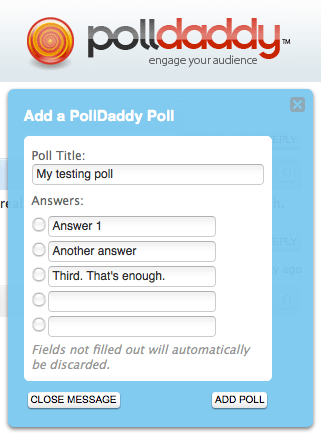
PollDaddy
This plugins allows you to add a poll to your comment. By the way, PollDaddy is also an Automattic brand.
Seesmic
Seesmic enables video comments that you can record right off your webcam.

YouTube
I think this one is self-explanatory – you can easily insert youtube videos into your comments.

Smileys
Adds smiley support.
You can activate the plugins by …
If you're like me, most of your WordPress plugins are checked out into your plugins directory from the official WordPress SVN repository or some other one. I haven't updated any of mine for about a month and wanted to sync up everything quickly (including SVN externals). Here's a short command I ran to achieve that:
1 2 |
cd YOUR_BLOG_ROOT/wp-content/plugins; find . -maxdepth 1 -type d -exec svn up {} \; |
What this command does is finds the top level directories in your WordPress plugins directory, then applies the "svn update" command to each, one by one.
The result is something like
 beer planet is a blog about technology, programming, computers, and geek life. It is run by Artem Russakovskii - a local San Francisco geek who is currently pursuing his own projects and regularly enjoys hacking Android, PHP, CSS, Javascript, AJAX, Perl, and regular expressions, working on Wordpress plugins and tools, tweaking MySQL queries and server settings, administering Linux machines, blogging, learning new things, and other geeky stuff.


