Updated: October 22nd, 2011
sysbench – Linux test bench. Easy as pie to test CPU, memory, threads, mysql, and disk performance.
Full description is available here: http://sysbench.sourceforge.net/docs/
install mysql, mysql-devel wget http://downloads.sourceforge.net/project/sysbench/sysbench/0.4.12/sysbench-0.4.12.tar.gz tar xvzf sysbench*gz cd sysbench* ./configure && make install |
mysql tests
This will run 10 separate consecutive mysql tests using an InnoDB table type, each with 100 mysql threads, doing a total of 1000 various SQL operations per test. Then it will print the total time they took to finish:
I've recently installed eAccelerator on the web server that hosts this site and I wanted to share some of my impressions after a few days.
- What does it do? Nobody put it better than the eAccelerator team itself: "eAccelerator is a free open-source PHP accelerator, optimizer, and dynamic content cache. It increases the performance of PHP scripts by caching them in their compiled state, so that the overhead of compiling is almost completely eliminated. It also optimizes scripts to speed up their execution. eAccelerator typically reduces server load and increases the speed of your PHP code by 1-10 times."
- Does it work? Hell yes. beerpla.net loads on average twice as fast as before. The results are consistent, so I'm very
…
At the recent Seattle Conference on Scalability organized by Google, Cuong Do, an engineering manager at YouTube, talks about YouTube's growth over the past 2 years and the scalability problems they have overcome. All in all, it's a very interesting presentation that I can recommend to anyone remotely interested in large-scale projects, such as YouTube.
One interesting fact that Cuong mentions is that the pre-Google YouTube tech team consisted of only 2 sysadmins, 2 scalability software architects, 2 developers, 2 networks engineers, and 1 DBA. It's quite impressive that such a small team managed to maintain and scale such a widely popular service.
Here's the presentation (52min long):
…
How To Resize/Grow VMware Linux Disks and Partitions
Updated: January 18th, 2009
In this article, I will show how to resize a VMware disk if you didn't make it large enough when it was created. Furthermore, I will show how to resize partitions following the disk augmentation using OpenSUSE 10.2 as an example. You will even be able to resize the Linux root partition (/) that is mounted and is normally unmountable.
The story: this is simple – you made a VMware disk without thinking ahead and now it ran out of space. Here you have a few options, the most notable ones being create another disk and mount it or grow the existing disk and …
Watch – A Useful Linux Command You May Have Never Heard Of
Updated: November 9th, 2007
How many times did I want to watch a directory waiting for a file to appear in it? Constant ls, for example, quickly got boring. A quick Perl script that would reload ls every 5 seconds… yeah it works but it takes a while to type up, and often enough I'm too lazy for that. And then I found 'watch' – a utility that comes with most *nix distros. Look at this beauty [man watch]:
NAME
watch – execute a program periodically, showing output fullscreen
SYNOPSIS
watch [-dhvt] [-n ] [–differences[=cumulative]] [–help]
[–interval=] [–no-title] [–version]
DESCRIPTION
watch runs command repeatedly, displaying its output (the first screen
full). This allows you to watch the program output change over time.
By default, …
Updated: November 9th, 2007
So today I was looking for a proper sources.list file that would work for apt-get in SUSE 10.2 since the one in yast and smart repositories comes with a broken list. And by broken I mean completely f***ed.
apt-get update Err ftp://mirrors.mathematik.uni-bielefeld.de SuSE/10.2-i386 release Could not resolve 'mirrors.mathematik.uni-bielefeld.de' Get:1 ftp://ftp4.gwdg.de SuSE/10.2-i386 release Ign ftp://ftp4.gwdg.de SuSE/10.2-i386 release Err ftp://mirrors.mathematik.uni-bielefeld.de SuSE/10.2-i386/base pkglist Could not resolve 'mirrors.mathematik.uni-bielefeld.de' Err ftp://mirrors.mathematik.uni-bielefeld.de SuSE/10.2-i386/base release Could not resolve 'mirrors.mathematik.uni-bielefeld.de' Err ftp://mirrors.mathematik.uni-bielefeld.de SuSE/10.2-i386/update pkglist Could not resolve 'mirrors.mathematik.uni-bielefeld.de' Get:1 ftp://ftp4.gwdg.de SuSE/10.2-i386/base pkglist Err ftp://mirrors.mathematik.uni-bielefeld.de SuSE/10.2-i386/update release Could not resolve 'mirrors.mathematik.uni-bielefeld.de' Err ftp://ftp4.gwdg.de SuSE/10.2-i386/base pkglist Unable to fetch file, |
…
Linux openSUSE 10.2 Learning Experience #1: Introduction
Updated: June 24th, 2020
The purpose of this article is to:
- introduce the new Linux section of the site (specifically dedicated to openSUSE).
- provide a very short description of Linux and compare it to other operating systems.
- answer some installation questions.
I'm a Windows user, I admit it. Not because I enjoy frequent reboots, freezes, and other unexplainable quirks. It's mostly because I have so many programs I'm used to, it would be impossible to switch to anything else, and I know ins and outs that allow me to be very comfortable with the Windows. I'm talking 20-30 programs I'm not willing to give up any time soon.
 However, I also have deep respect for *nix based systems. I started using them back in …
Updated: November 4th, 2007
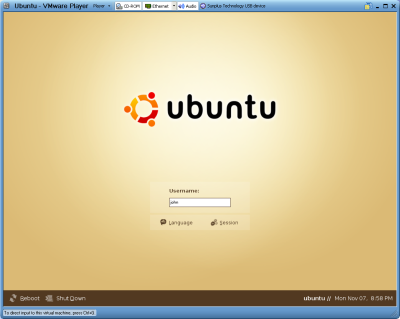
Installed Ubuntu LTS 6.06 as a 2nd OS on my Dell E1505 laptop today after delaying doing this for a while. This article from digg finally made me install it, which took roughly 10 minutes, as it mentions. Compare this and 0 reboots to 45min and 5 reboots installing Windows. Ubuntu's pretty damn sweet; I'm gonna go tweak it now with the help of Arthur. I'm predicting that Linux (and Ubuntu in particular, as of now) will eat up Windows' market share surely and quickly. The dual boot is very friendly, it uses GRUB as the boot manager. To boot directly into Windows by default, I edited /boot/grub/menu.list from Ubuntu….
 beer planet is a blog about technology, programming, computers, and geek life. It is run by Artem Russakovskii - a local San Francisco geek who is currently pursuing his own projects and regularly enjoys hacking Android, PHP, CSS, Javascript, AJAX, Perl, and regular expressions, working on Wordpress plugins and tools, tweaking MySQL queries and server settings, administering Linux machines, blogging, learning new things, and other geeky stuff.


