Debugging Weird sshd Connection Problems + What Happens When You Stop sshd
So the other day I was setting up public key authentication for one of my users, which is usually very straightforward: generate a private/public key pair, stick the private key into user's .ssh dir, set dir permissions to 0700, private key permissions to 0600, stick the public key into the authorized_keys file on the server, and the job's done. However, this time, no matter what I was doing, the public key was being rejected or ignored and the system was moving on to the keyboard-interactive authentication.
Debugging on the client side with -v didn't help much:
How To Fix symbol lookup error: /usr/sbin/httpd2-prefork: undefined symbol: apr_ldap_ssl_init
Apache stopped starting today for no apparent reason.
1 2 3 4 5 6 7 |
rcapache2 restart /usr/sbin/httpd2-prefork: symbol lookup error: /usr/sbin/httpd2-prefork: undefined symbol: apr_ldap_ssl_init Starting httpd2 (prefork) /usr/sbin/httpd2-prefork: symbol lookup error: /usr/sbin/httpd2-prefork: undefined symbol: apr_ldap_ssl_init The command line was: /usr/sbin/httpd2-prefork -f /etc/apache2/httpd.conf -DSSL failed |
The command line was:
/usr/sbin/httpd2-prefork -f /etc/apache2/httpd.conf -DSSL
failed
So I tried reinstalling libapr and apache2-utils related stuff with no luck. ldconfig didn't help either. It's not until I looked at /usr/lib and relinked a few things that it started working. What the hell, SUSE?
How To Check If The Local SVN Revision Is Up-To-Date
I've encountered a problem recently where I had to figure out if some checked out code is up-to-date with the svn repository, without actually running svn update. Unfortunately, svn update doesn't have a dry-run option, so I had to find another solution.
I came up with 2, depending on how detailed the information needs to be, which I'm about to share in this post.
1. If you want exact file and directory names, you can run:
svn status -u |
If any files need updating, you will see a * before the file name.
svn status wc M wc/bar.c A + wc/qax.c |
Updated: June 1st, 2008
Recently I ran into major problems using GNU diff. It would crash with "diff: memory exhausted" after only a few minutes trying to process the differences between a couple 4.5GB files. Even a beefy box with 9GB of RAM would run out of it in minutes.
There is a different solution, however, that is not dependent on file sizes. Enter rdiff – rsync's backbone. You can read about it here: http://en.wikipedia.org/wiki/Rsync (search for rdiff).
The upsides of rdiff are:
How To List Files Within tgz (tar.gz) Archives
This may not be very obvious but this is the command line to list files within a tar.gz archive on the fly:
1 |
tar -tzf file.tar.gz |
-t: lists files
-f: instructs tar to deal with the following filename (file.tar.gz)
-z: informs tar that the it's dealing with a gzip file (-j if it's bzip2)…
Do NOT Use This Perl Module: Passwd::Unix
Updated: April 29th, 2008
Update: The author of the module contacted me the same day and promised to fix it in the next version. Version 0.40 was indeed on cpan as promised, but I haven't tested it yet.
Passwd::Unix will corrupt your /etc/shadow file and rearrange login names and their corresponding password hashes.
The current version of Passwd::Unix corrupted my /etc/shadow upon only
calling the passwd() function. Immediately users started to report not
being able to login.
After examining the situation, I found that Passwd::Unix rearranges all
users in /etc/shadow in some way, but it only does it to the
usernames, and not the password hashes. Thus, you will get corrupted accounts. Moreover,
users are now able to login to one OTHER account, not …
Updated: April 23rd, 2008
[WORK IN PROGRESS] Here is a list of commands that I use every day with vim, in no particular order. Out of a billion possible key combinations, I found these to be irreplaceable and simple enough to remember.
|
* |
search for the word under cursor (to the end of the file) |
|
# |
search for the word under cursor (to the top of the file) |
|
ctrl-p,ctrl-n |
suggest (p)revious or (n)ext autocomplete from the list of existing keywords in the file or included files (!). |
|
:go NNN |
go to byte NNN |
|
. |
redo last command |
|
/SEARCH TERM |
search document for SEARCH TERM |
|
:%s/FOO/BAR/gci |
replace FOO with BAR (g)lobally, case (i)insensitively, and asking for (c)onfirmation |
…
Updated: July 8th, 2009
Today I was asked a question about defining custom extensions for vim syntax highlighting such that, for example, vim would know that example.lmx is actually of type xml and apply xml syntax highlighting to it. I know vim already automatically does it not just based on extension but by looking for certain strings inside the text, like <?xml but what if my file doesn't have such strings?

After digging around I found the solution. Add the following to ~/.vimrc (the vim configuration file):
1 2 3 |
syntax on filetype on au BufNewFile,BufRead *.lmx set filetype=xml |
After applying it, my .lmx file is highlighted:

Same principle works, for instance, for mysql dumps …
Updated: January 4th, 2009
Here are some quick links for now: http://blogs.mysql.com/kaj/2008/05/23/mysql-clusters-improved-release-model/, http://johanandersson.blogspot.com/2008/05/mysql-cluster-62-officially-released.html, http://blogs.sun.com/theaquarium/entry/improved_release_model_for_mysql.
This article contains my notes and detailed instructions on setting up a MySQL cluster. After reading it, you should have a good understanding of what a MySQL cluster is capable of, how and why it works, and how to set one of these bad boys up. Note that I'm primarily a developer, with an interest in systems administration but I think that every developer should be able to understand and set up a MySQL cluster, at least to …
MySQL Conference 2008
Updated: March 26th, 2008
April 14-17th is going to be an exciting time. Why? Because the 2008 MySQL Conference and Expo is going to be held in Santa Clara, CA. Who would want to miss out on a chance to lurk around, let alone talk to, some of the smartest people in the MySQL world? Well, those who don't have at least $1000+, of course. A 3 day pass to the conference without tutorials costs a whopping $1199. A full pass would dry up your pockets $1499.
Well, "good news everyone". Thanks to Sheeri Cabral of The Pythian Group, PlanetMySQL.org, Jeremy, and, most importantly, LinuxQuestions.org, I am now in possession of a 3-day conference pass!! I'm incredibly excited that I …
How To Delete All Messages From A Folder In Pine
Pine is a UNIX command line mail application. So how do you delete all messages in a folder?
The combination is
1 |
; A A D |
If after pressing ; you see
1 |
[Command ";" not defined for this screen. Use ? for help] |
then you don't have a check in the "Enable aggregate command set" settings checkbox. To enable it, go to the main menu (M) -> Setup (S) -> Config (C) and scroll down to "Enable aggregate command set". Then press X (to check it), E (Exit). Now repeat the above….
Updated: March 18th, 2008
Today Robin Schumacher, MySQL's Director of Product Management, announced that the mysql Falcon storage engine has moved into a beta release stage. Falcon, a new transactional storage engine introduced in mysql 6 (aka 5.2), has been in alpha for years. Other popular storage engines include MyISAM, InnoDB, which Falcon is supposed to challenge (successfully? :-/), and the upcoming Maria.
Falcon features:
- ACID transaction compliant
- Crash recovery
- User-defined tablespaces
- High-speed data caches
- Advanced B-Tree indexes
- Performance/diagnostic monitoring tables
- Simplified configuration
You can download mysql 6 with Falcon here: http://dev.mysql.com/downloads/mysql/6.0.html….
Updated: March 18th, 2008
"Didn't see that one coming. Their blog contains details to what this could mean for both companies. May as well be one of the most important takeovers of 2008 already!"
Could this mean that the mysql cluster is finally going to get proper development attention? I don't know but sure as hell hope so. Congratulations to all mysql employees!…
Make Screen and YaST Work Together
Updated: March 19th, 2008
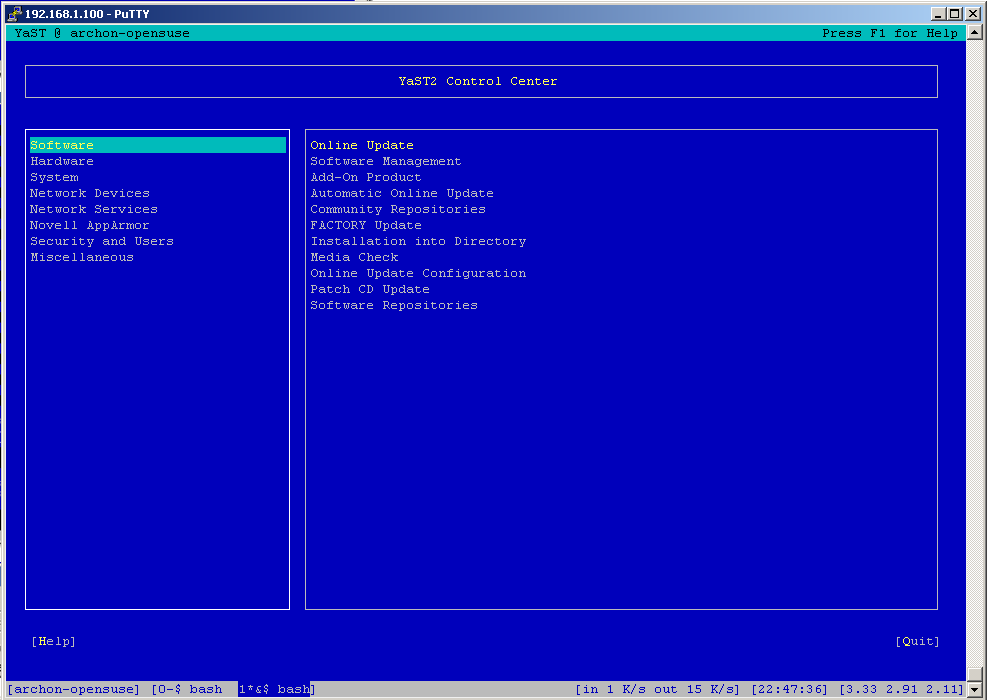
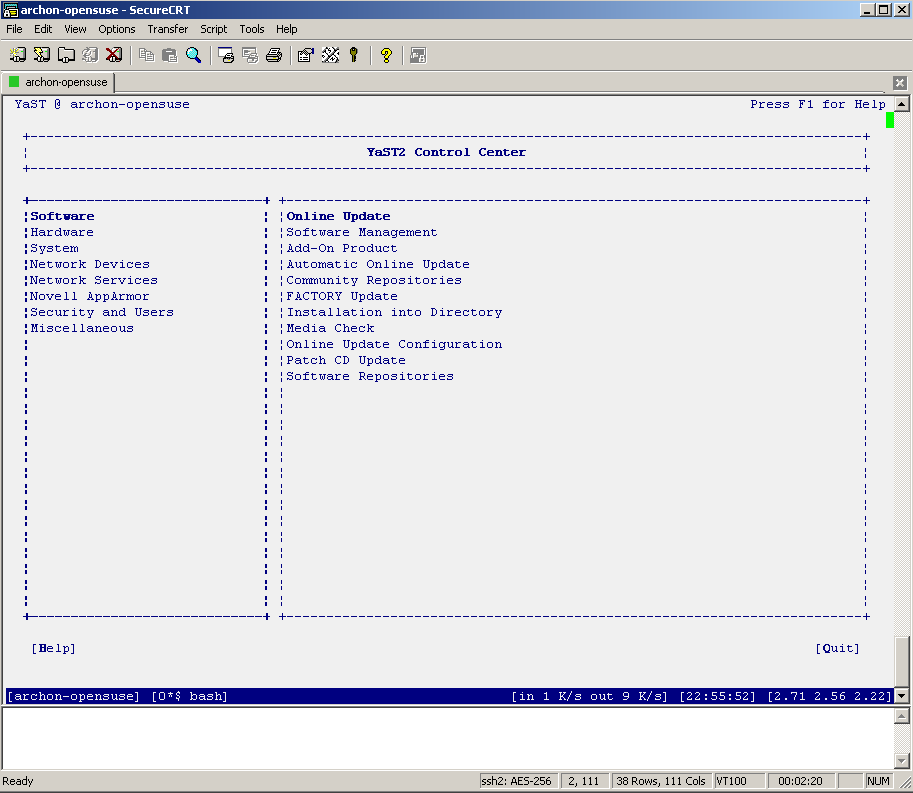
I don't know about you but I've had a lot of problems making screen work nicely with YaST. Both putty and SecureCRT had major problems displaying YaST's ncurses interface. The screenshots below depict the problem quite clearly. If at this point you don't see anything like this, you are most likely not affected and can go get a beer.
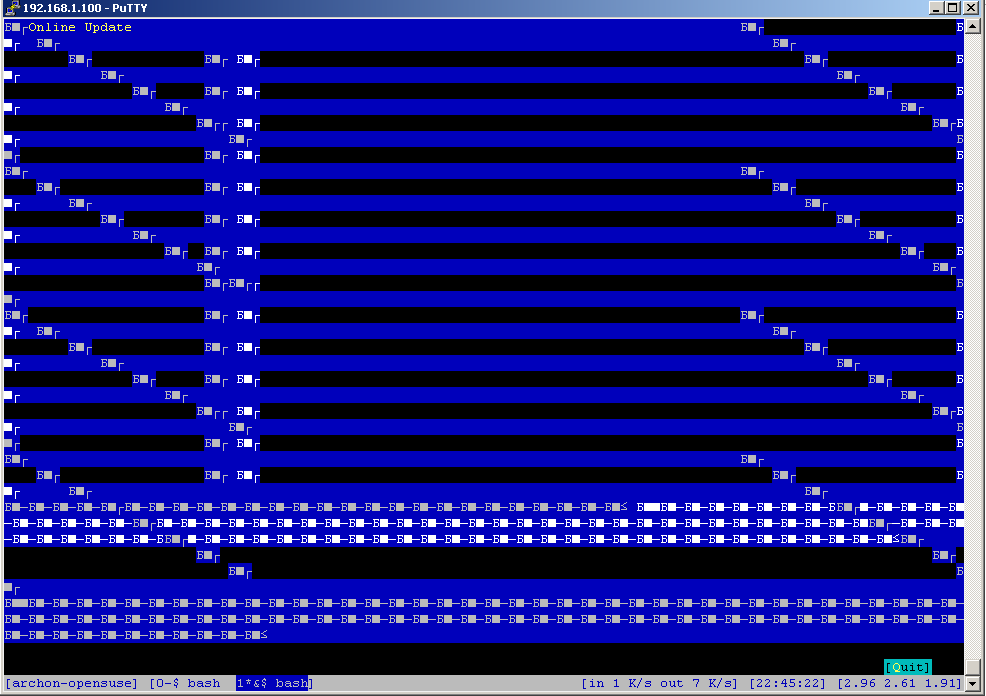
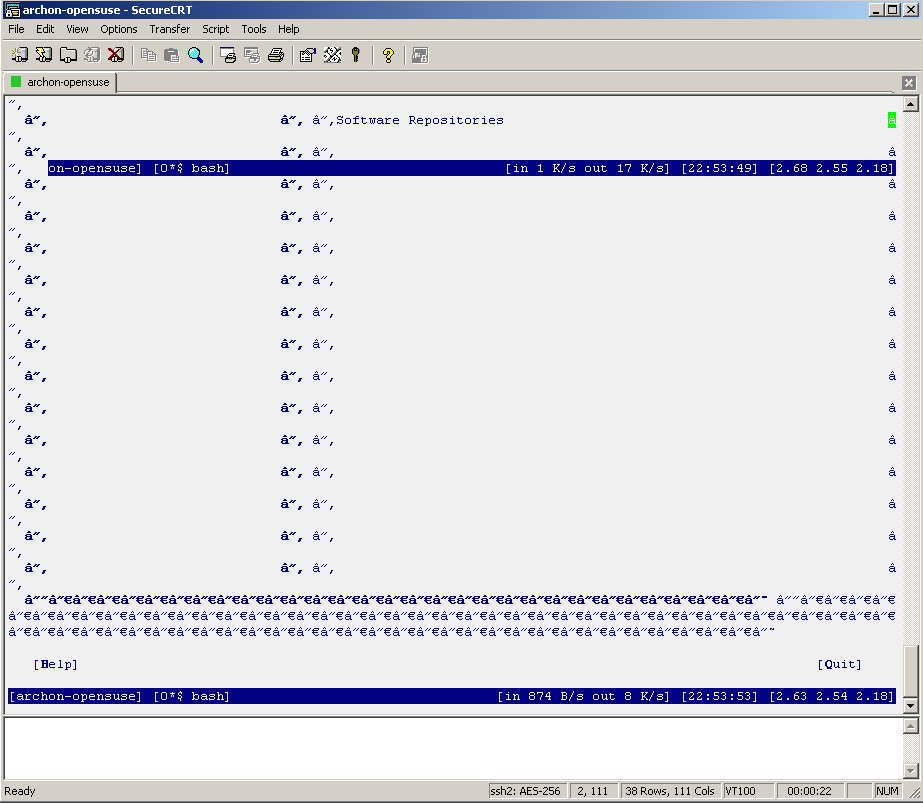
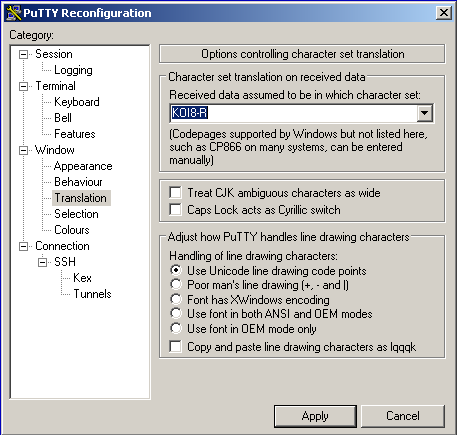
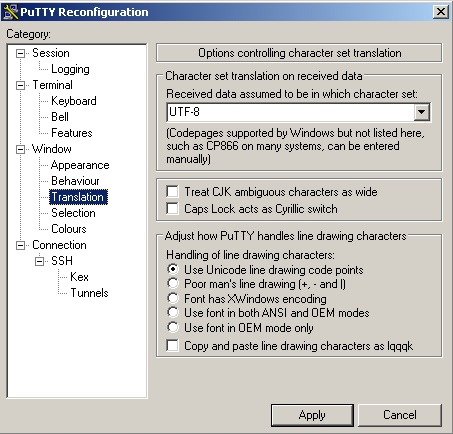
If you are seeing similar problems, here's the fix. After digging around a bit, I have discovered that the problem was incorrect data encoding. My character set was set to KOI8-R while ncurses expected UTF-8. Here is how to change the corresponding setting in putty:
… and SecureCRT:
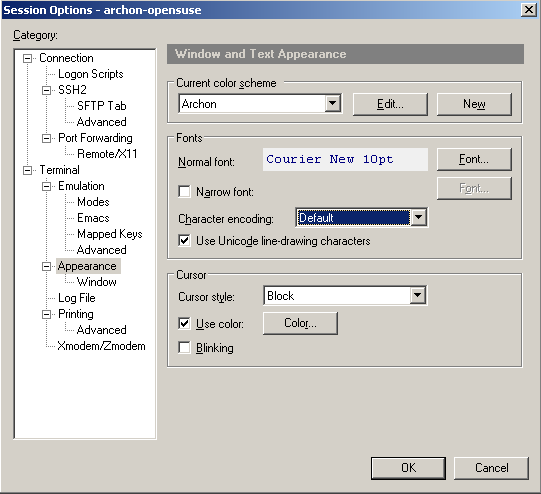
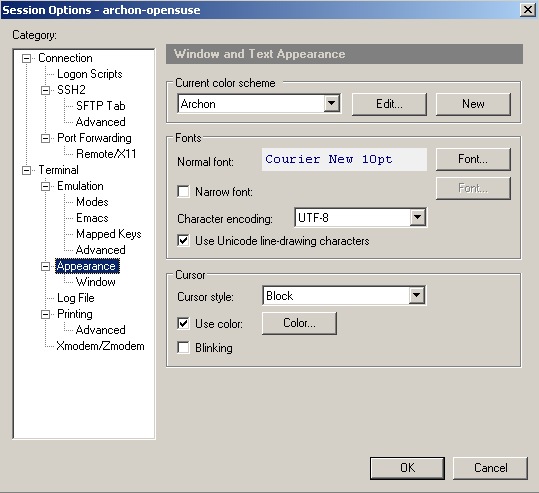
Now restart YaST and voila:
P.S. You may be wondering why my screen …
cpan – The Perl Module Manager
Updated: March 19th, 2008
cpan is a perl module manager. To get into cpan, login as root and type in
cpan |
Install a module:
cpan install MODULE |
Upgrade a module:
cpan upgrade MODULE |
Reinstall a module or force install in case of failed tests:
force install MODULE |
See a list of upgradable modules:
r |
See cpan configuration (that's the letter 'o'):
o conf |
Update an option in cpan configuration:
o conf OPTION_NAME OPTION_VALUE |
It is always nice to:
upgrade CPAN install Bundle::CPAN |
If there's an error making a Perl module, it can be caused by a missing make path in cpan configuration. In …
 beer planet is a blog about technology, programming, computers, and geek life. It is run by Artem Russakovskii - a local San Francisco geek who is currently pursuing his own projects and regularly enjoys hacking Android, PHP, CSS, Javascript, AJAX, Perl, and regular expressions, working on Wordpress plugins and tools, tweaking MySQL queries and server settings, administering Linux machines, blogging, learning new things, and other geeky stuff.


