Is Your Simplifymedia For Winamp Broken On A 64 Bit Windows 7? Here's How To Fix It

SimplifyMedia is an extremely useful program, which allows super easy song and playlist sharing via streaming between multiple computers. It also works as a Winamp plugin, so the shared songs simply show up inside Winamp's own media library – each computer sharing music appears under the special "Shared" tab. And the beauty is – there is no need to muck around with network settings, open ports, or even touch your router.
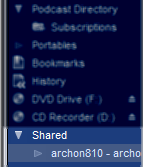
Here's a screenshot of how it's supposed to work:
The Problem
Since I recently installed Windows 7 64bit on my laptop, I wanted to set up SimplifyMedia on it and listen to some tracks in my favorite music player Winamp. However, after I downloaded and installed it and restarted Winamp, the Shared tab did not show up. The SimplifyMedia installer did tell me that a 64 bit version of Windows isn't explicitly supported but mentioned it should still work fine.
The Solution
After reinstalling, analyzing, and comparing with my other computers, I found that the SimplifyMedia installer didn't copy the needed Winamp plugin files, namely ml_simplify.dll and ml_simplifyexp.dll. After I copied them over into the Winamp/Plugins directory and restarted Winamp, the Shared tab showed up like a charm.
In the meantime, if you found this article useful, feel free to buy me a cup of coffee below.
 beer planet is a blog about technology, programming, computers, and geek life. It is run by Artem Russakovskii - a local San Francisco geek who is currently pursuing his own projects and regularly enjoys hacking Android, PHP, CSS, Javascript, AJAX, Perl, and regular expressions, working on Wordpress plugins and tools, tweaking MySQL queries and server settings, administering Linux machines, blogging, learning new things, and other geeky stuff.


