How To Fix ERROR_NOT_FOUND 0×80070490 During Windows 7 SP1 Installation
| Share |
Updated: May 17th, 2012
Well, this one took ages. And whenever something takes me ages, rather than write it down in my personal notes, I prefer to put it out online for everyone with the same problem to easily find and benefit from.
The problem I'm talking about today is trying to upgrade your Windows 7 installation to SP1 by applying Microsoft's update KB976932, called "Windows 7 Service Pack 1 for x64-based Systems" and getting nothing but a failure every time. The same problem may affect 32-bit systems as well, and I'm not sure what the update number for that would be, but the solution should work for either one.
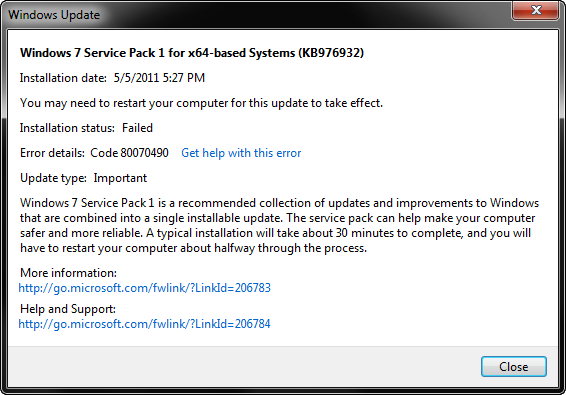
The update starts just fine, chugs along for 10 minutes or so, then reboots the system and starts performing more operations, when suddenly one of them fails about 10% down the road, reboots, and reverts the whole process. You end up with this message (code 80070490) and a failure for which there are a lot of useless "solutions" on the web that just don't work.
Except for one. I can't take credit for it – all I did was spend a month weeding through the crap, retrying, and getting nowhere, until a genius by the name Ben-IS came up with exactly the right diagnosis and provided exactly the right solution. This solution, in my own interpretation, is below.
Step 1
We are going to use a utility called SFC (System File Checker or Windows Resource Checker), which is part of the Windows installation. It will help diagnose the problem.
Open up a command prompt (cmd) as administrator and run
sfc /scannow
This will run for a while and produce a file called CBS.log which you can find in %WINDIR%\Logs\CBS (usually C:\Windows\Logs\CBS). See this KB929833 for more info on SFC and CBS (Component Based Servicing).
sfc /scannow
Beginning system scan. This process will take some time.
Beginning verification phase of system scan.
Verification 100% complete.Windows Resource Protection did not find any integrity violations.
Even though there are no integrity violations, we should have enough info in the log to diagnose the problem.
Step 2
Unfortunately, Windows overwrote my CBS.log, so I'll go by the one Ben-IS provided.
Open up CBS.log and look for something like Failed uninstalling driver updates or 0×80070490 – ERROR_NOT_FOUND.
If you have this line, which you should if you're reading this post, you should also see lines similar to these a few lines above:
2011-04-14 12:02:33, Info CBS Doqe: q-uninstall: Inf: usbvideo.inf, Ranking: 2, Device-Install: 0, Key: 598, Identity: usbvideo.inf, Culture=neutral, Type=driverUpdate, Version=6.1.7600.16543, PublicKeyToken=31bf3856ad364e35, ProcessorArchitecture=amd64, versionScope=NonSxS
2011-04-14 12:02:33, Info CBS Doqe: q-uninstall: Inf: sffdisk.inf, Ranking: 2, Device-Install: 0, Key: 599, Identity: sffdisk.inf, Culture=neutral, Type=driverUpdate, Version=6.1.7600.16438, PublicKeyToken=31bf3856ad364e35, ProcessorArchitecture=amd64, versionScope=NonSxS
2011-04-14 12:02:33, Info CBS Doqe: q-uninstall: Inf: sdbus.inf, Ranking: 2, Device-Install: 0, Key: 600, Identity: sdbus.inf, Culture=neutral, Type=driverUpdate, Version=6.1.7600.16438, PublicKeyToken=31bf3856ad364e35, ProcessorArchitecture=amd64, versionScope=NonSxS
One of these .inf files is the culprit, and we're going to find out which one in the next step.
Step 3
Now open up a different log file located at %WINDIR%\inf\setupapi.dev.log (normally c:\Windows\inf\setupapi.dev.log).
Look for a line that contains Failed to find driver update or FAILURE(0×00000490).
Note the exact path to the .inf file that failed. In my case, it was:
sto: Failed to find driver update 'C:\Windows\WinSxS\amd64_usbvideo.inf_31bf3856ad364e35_6.1.7600.16543_none_8a1a2513d42628c3\usbvideo.inf' in Driver Store. Error = 0×00000490
Step 4
This is the key to the whole operation. Open up the command prompt again (cmd) as administrator and run
pnputil -a INSERT_FILE_NAME_FROM_STEP_3
For example, I ran
pnputil -a C:\Windows\WinSxS\amd64_usbvideo.inf_31bf3856ad364e35_6.1.7600.16543_none_8a1a2513d42628c3\usbvideo.inf
You should see the following dialog:
Choose Install this driver software anyway.
The end result should be something like this:
pnputil -a C:\Windows\WinSxS\amd64_usbvideo.inf_31bf3856ad364e35_6.1.7600.16543_none_8a1a2513d42628c3\usbvideo.inf
Microsoft PnP UtilityProcessing inf : usbvideo.inf
Driver package added successfully.
Published name : oem69.infTotal attempted: 1
Number successfully imported: 1
Repeat this step for any failures found in step 3.
Step 5
Apply the SP1 Windows Update again – it should now install successfully.
And voila – enjoy your SP1!
Microsoft has failed to fix this incredibly cryptic problem, leaving it up to the users to figure out why their SP1 updates are not installing. Thanks to people like Ben-IS, solutions no longer involve head-banging, postal rage, and f7u12.
Artem Russakovskii is a San Francisco programmer, blogger, and future millionaire (that last part is in the works). Follow Artem on Twitter (@ArtemR) or subscribe to the RSS feed.
In the meantime, if you found this article useful, feel free to buy me a cup of coffee below.
beer planet is a blog about technology, programming, computers, and geek life. It is run by Artem Russakovskii - a local San Francisco geek who is currently pursuing his own projects and regularly enjoys hacking Android, PHP, CSS, Javascript, AJAX, Perl, and regular expressions, working on Wordpress plugins and tools, tweaking MySQL queries and server settings, administering Linux machines, blogging, learning new things, and other geeky stuff.
Those are good instructions. You forgot to mention that you will need a Windows 7 CD in the CD tray to run sfc /scannow. Otherwise it will prompt you for it all the time.
I never had to use my Windows CD at all.
True, because integrity check did not have any errors to fix. Should there be any, it will ask for the Win 7 (or whatever Windows) CD to copy over original files.
Thank you so much for this!! We had 8 different failures and thanks to other forum posts, fixed 7 of them but one laptop failed repeatedly with no fix in sight. Your post gave us the right instructions to fix it!
Great instruction. I had few notebooks in my company with this error. Now I fix them all and installation of service pack finished without problem. Thank you.
Been trou this staps but still encountering the saem error…
darn microsoft…
did the scan and looked in the file on step 2 but did not find what you were mentioning.
But at step 3 i did find the files and executed with step 4 all the "missing" drivers and than step 5 but again it fails…
what could i still be doing wrong or could there be more?
mine ends at 11% btw…. if any more info is required please say so i would like to get this over with as it irritated me
Damn it's working, thanks a lot Artem!!
I love you
)
I've been trying for a few months to fix this and your tutorial is the only one that address the issue correctly.
However I have experienced a problem after applying the fix. The BOOTMGR was missing and I had to run repair BOOT errors from Windows 7 CD. Not a big issue at all, but it's good to know.
Cheers man !
Bogdan
That routine is fucking great!! After weeks of searching in the dark, you gave me the right instructions to fix Bill's shit, Artem. Thank you so much. The only phenomena I had was, it din't work at the first run. Every time I ran one more cycle, the setupapi.dev.log found another .inf file missing. So, I installed one more and the installation went some percent higher than before. Finally, after five trials, I could break through. Just fantastic.
This is exactly what I had. I had to run the Service Pack Setup like 3 times until… No more errors were there. There was a driver update count: 62. But he errored on the 59th. I fixed that, ran again, now it errored on the 60th and so on… I hope nobody has the same error with it dying on the 5th or so driver update…
Merci merci merci !!!
3 months I was looking for a solution… (ok, not non stop but..)
This is the only solution which worked on my laptop : 1215n eeepc, windows 7 32bits home premium.
Regards
Finally a fix to this problem which Microsoft can't properly fix themselves!
Thank you very much!!
This worked perfectly. Thanks.
Works for me too! Have a premium cup of coffee on me.
wish i could upvote you. thanks a ton
Perfect Solution. Was struggling to get this to work until i found your post.
Thanks a lot
I also give hearty thanks for giving a solution to a problem that has caused me untold hours of grief. In my case I could not make steps 1 and 2 work at all, and frankly I see no reason for them and am not sure why they are included here. I had to repeat steps 3 onward about six times to get all the .inf files fixed. Thank you so much!
You have no idea how frustrating things were getting until i found your god send solution! Thank you so very much and i hope that last part comes true sooon enough!!
God Bless!!
Nabil J.
You made my day
Thank you for the usefull help it gave the right solution to the problem.
Grtz from Holland
If you get an 'acces denied' message in step 4, click Start, Select Accessories, right click command prompt and select 'run as administrator'. This did it for me. Thanks.
In step 2 I can't find something like Failed uninstalling driver updates, but I find 0×80070490 – ERROR_NOT_FOUND.
?
In step 3 I can't find something Failed to find driver update or FAILURE(0×00000490). What should I do
This is THE solution!
Thank you so much!
Step 4 is not working for me. Exact the same inf problem and need to install the same driver software.
log:
!!! sto: Failed to find driver update 'C:\Windows\WinSxS\amd64_usbvideo.inf_31bf3856ad364e35_6.1.7600.16543_none_8a1a2513d42628c3\usbvideo.inf' in Driver Store. Error = 0×00000490
<<< Section end 2011/09/23 11:18:22.338
<<< [Exit status: FAILURE(0x00000490)]
pnputil -a error:
Adding the driver package failed. The style of the inf is different than what was requested
Artem,
> You end up with [...] a lot of useless "solutions" [...] Except for one.
Yes, exactly, and it was you who finally made my day. I just wanted to say a big "thank you"!
Best regards from Hamburg, Germany.
Wolfgang
LOL why don't you have a +1 button on your blog you run a friggen Android blog.
I haven't updated the layout of this blog in over a year, since AP launched. Either way, this is not an Android blog and +1 doesn't even have anything to do with Android. I may add it at some point.
Fantastic instructions – worked like a treat for me
I had to run CMD as administrator, and didnt find the error when following step 2, but did find it when I followed step 3.
This needs to be published as the recovery instructions
Geordie from the UK
Thanks Man!
Exact the same error as you, and what a pleasure to finally get rid of that annoying thing…
/Jrt, Denmark
This absolutely worked for me too.
Didn't need Steps 1 and 2.
C:\Windows\WinSxS\amd64_usbvideo.inf_31bf3856ad364e35_6.1.7600.16543_none_8a1a2513d42628c3\usbvideo.inf
was the culprit.
Thanks so much!
Thanks, Artem!
Thought I was faced with a complete reinstall as my laptop not provided with Windows disks – only recovery disks to revert to factory condition.
As noted by Hellijoe and Brian above, took several repeats of steps 3 onwards to fix all inf errors (5 in total). But worked brilliantly.
A shame there is no acknowledgement of this problem/solution on microsoft help and support. Clearly it's a common problem as any google search will show.
Best Regards, and thanks again!
How do you run cmd as an administrator?
My account is an administrator account, but when I run cmd it says:
C:UsersCarl>
and when I try: sfc /scannow
I get the message:
You have to be an administrator … to use the sfc tool.
How do I get through this?
Thanks!
Press the Win key, type in 'cmd', then right click on cmd that appears in the list and click Run As Administrator.
When I type: %systemroot%logscbscbs.log
in the cmd as admin, I get the result:
"Access denied."
Why is that? How can I find the cbs.log file?
Hey Carl, you can skip step 2 and go directly to step 3 – I got the same problem here… just look for the error in the c:\Windows\inf\setupapi.dev.log file.
I have found my CBS log as a text document, so far so good.
But I can't find any line containing the error code (80070490) I get when my SP 1 fails to install. I even get zero results when I search for "driverupdate" in the log…
How can this be?
Thanks!
Best way to fix these kinds of errors once and for all for me was to switch to GNU/Linux. Took them problems right off.
It is not the best solution, but yeah I also do the same:) Linux Rocks.
But what if you are stuck with windows for some reason?? That is my current condition:(
Thank you so much Artem Russakovskii!!! You solved a problem that microsoft is unable to solve until now!! For those having problem with the CBS.log file, you can skip step 2 and go directly to step 3 – just look for the error in the c:\Windows\inf\setupapi.dev.log file.
Beautiful fix!! I kneel at your feet and want only to tie your shoelaces for the rest of my life.
Just found your site while trying to update some info on the topic.
I'm glad that you found my posting on the MS forum and shared it with others here.
Seeing how many more people this helped makes me feel much better at the time it took me to figure it out!
- Ben
Almost given up, when I ran into your page.
Tank you, thank you, Thank You. I'm am só happy!
Marcel,
Netherlands
Thanks a lot this thing help me too much
Thanks thanks thanks thanks a lot my brother Artem.I did it and it worked. I am very pleased to you.Thanks thanks.You are the man of year for me Artem
someone should make a batch file for this solution,.
Like commenters pointed out above, setupapi.dev.log can only identify one missing inf at a time, so multiple iterations were needed. I fixed 3 inf's so far (usbvideo, sdbus, and sffdisk) and about to start the 4th install.
Also, what exactly is the purpose of running the first two steps? Seems to me like you can just start with step 3.
thanks a ton for this guide…it totaly helped me..
u guys proved tat u are gr8….
True tat even microsoft ppl couldn solve it…
Thanks again!!!!!!!!!
a big thanks, was fighting this error for a couple days on a new build.
I'm probably the last one to update to SP1 due to this problem, and I'm grateful for the resolution found here and nowhere on MS pages.
Just wanted to thank you for this clear and concise write up. Everything worked like a charm (minus SP1 failing the first time, of course!).
Thanks again.
Thank you so much for publishing this fix, worked great.
With regards step 2, I couldn't find any failed drivers in the log, but continuing from step 3 onwards worked perfectly.
Enjoy the coffee !
Adam
I was so happy to see this post, as this issue has been biothering me for weeks.
However, when I run the pnputil, I get the message: "Adding the driver package failed: Invalid INF passed as parameter."
I noticed after running sfc scannow, the log said, "Cannot repair member file usbvideo.inf version 6.1.7600.16543," which is of course the problem file.
Any idea of what my options are at this point? I'm considering doing a Winows 7 repair install, which hopefully will repair that file, but I also wondered if there is a way to get this particular usbvideo.inf file somewhere else and put it in the right folder.
Thank you so much ,dude!!!!!!!
You don't even know how hard I searched
for this great fix…
ok, it's not working i'm stuck at the pnputil -a thing it just isn't moving still says total attempted: 0 and the other one is 0 to…
Sounds good, but didnt work for me either… I cannot find anything in setupapi.dev.log file that contains the text 'Failed to find driver update' or 'FAILURE(0×00000490)'.
Any recommendations please? This is driving me up the wall!
Thank you for carefully explaining this fix. I used it on Windows 2008 R2 when SP1 failed to install about 20 times. I had tried everything including hotfixes and Microsoft support.
I didn't need to do the sfc command because the setupapi.dev.log already had that error in it several times.
I was amazed when SP1 finally installed. Thank you Artem and also to Ben-IS.
Absolutely great!! I have tried so much and now have successfully installed the service pack!! Thank you very much!!!
Thank you very much for posting this great tutorial.
Thanks > i havnt get successful .
i have had 7 tries to fix all .inf files and i dont know where i will stop
is there any way to fix all .inf files with one try ?
a way to know all the .inf files which need fix ?????
each time i try to install sp1 i got failure because of a new .inf file appears
Great great great work!! This is the only thing that worked for me, forget the application that MS provides, it does nothing to fix the problem. I was out of my wits trying to install the SP1 all day yesterday,until i came up on this article, it's the solution guys. I can vouch for it. It installed after the first try, doing all it says here and now i am one happy fellow. Keep up the good work and thanks a lot !! Cheers mate !
Thank you very very much, for taking the effort to document the solution to a most annoying and persistent problem. Microsoft, please take heed.
Vielen lieben Dank aus Bremen.
Thank you very much, your coffee is getting cold.
Thank you soooooo much for the fix, been ready to pull out what hair I had left. Been searching the Microsoft forums for weeks to no avail. Thanks for taking the time to make this fix public and thank you to Ben-IS for all your work
…. or update the Intel Graphics Driver
Best regards,
Wedo
Worked like a charm, thank you very much for the clear instructions and explanation. Now I can play max payne 3!
Thank you! Thank you! Thank you!
I have been searching the web for weeks to fix this problem! Again I thank you!
thank you for this. FYI this is the second result that pops up in bing search, and your description makes it obvious that this is the search result to click. ie: "Well, this one took ages. And whenever something takes me ages, rather than write it down in my personal notes, I prefer to put it out online for everyone with the same problem to easily find and benefit from."
-THANK YOU AGAIN!
robert
darien, IL
Hey – this did the trick. Unfortunately I can't stick all the hair I pulled out back into my head! Will get you a cup of coffee now. Thanks again
Ziggy
Bought you a beer. By the way the pnputil – a didn't work I had to use pnputil/a (file location)
Ziggy
Thanks. Hope you don't mind if I use it on a beer instead
And weird about the pnputil. Here's what mine says on Win7x64:
pnputil
Microsoft PnP Utility
Usage:
——
pnputil.exe [-f | -i] [ -? | -a | -d | -e ]
Examples:
pnputil.exe -a a:\usbcam\USBCAM.INF -> Add package specified by USBCAM.INF
pnputil.exe -a c:\drivers\*.inf -> Add all packages in c:\drivers\
pnputil.exe -i -a a:\usbcam\USBCAM.INF -> Add and install driver package
pnputil.exe -e -> Enumerate all 3rd party packages
pnputil.exe -d oem0.inf -> Delete package oem0.inf
pnputil.exe -f -d oem0.inf -> Force delete package oem0.inf
pnputil.exe -? -> This usage screen
Whereas Microsoft say the switches are
PnPUtil [/a [/i] InfFileName] [/d [/f] PublishedInfFileName] [/e] [/?]
I know the "-" did not work for me but the "/" did work.
BTW – it was meant for a beer
Ran through the process and fixed one inf file as shown in steps 3-4. But after trying to reintall SP1 i got the 80070490 error again.
Problem is, when I go back to the setupapi.dev.log file there is no trace of error 80070490. Looks like maybe some inf errors with 000000000. Should I replace those in the same fashion?
Not sure what to do..Any advice?
Thanks
I don't know how this worked or what I just did. But it worked fucking perfect! I have searched around the whole internet without getting an answer, and here it is! I can't thank you enough!!
Here's a cookie (:
WOW – thank you SO much! I had this issue a year ago when I first built my system, and after months of searching I just gave up. When I re-installed windows the other day, I ran into it again and decided to renew my efforts to fix it. Your instructions not only work, but are the only thing even coming CLOSE to addressing the problem. Unbelievable. Thanks again.
THANKS SO MUCH FOR YOUR POST.
This is absolutely insane… it is almost like MS chose not to fix it. I can't imagine this being a non-reproducible issue.
In what I have understood about this problem it seems to be AMD64 components. I had 5 such fixes to do… all for amd64_*.inf files.
THANKS AGAIN!
Unfortunately this fix didnt work for me for some reason. I continue to get the same 0×80070490 error. I have resigned myself to sticking with a non service packed version of Windows 7 x64. The upside is I save disk space.
Sweet…and digital life can begin again. Tip of the hat!
all was going well for this fix, but there is no c:\Windows\inf\setupapi.dev.log on my Win 7 64bit Dell Inspiron. I can see the errors in the CBS.log but cannot run the fix as the dev log does not exist. I can find a setupapi.offline txt doc but I take it this is not the correct log, as most of the entries are for the D drive which is the Dell recovery partition.
Any ideas?
Thanks
Thanks for your post, after many repetition of the steps you had given I was able to complete it !
In the end the dialog noted : )
Installation was not successful
The opertaion completed successfully.
(Details)
Error: DS_S_SUCCESS(0×0)
I presume programmer-programmer terms, that it is ok.
YOU SAVED MY DAY! Actually you save the SSD from being formated
Awesome and great explation, worked SWEEEEEET!
Great!! I solved by following the above steps.
Thank you very much!
I love it, this has been driving me crazy and now it's fixed!! Thank you…
This works with reinstalling drivers, but did not work for installing sp1 it still errord out. And then wehn you go back into the Windows\INF it creates a new setupaapi.dev.log file with same errors. Please help
SP1 is finally installed on my HP notebook. I spent so many hours, weeks, months trying different solutions. It's fixed now with one installation of USBVideo.inf. Thank you…..
that's great!! Hope you enjoy the coffee i just bought for you
I have tried everything to get this resolved and was finally starting to give up on SP1 – then stumbled on this pae! Thank you so, so much! Worked great and all installed! Thanks so much for your help!
All the best
Thanks Artem and Ben-IS – I was having a hell of a time trying to get SP1 installed on pretty much a fresh install of Win 7. Like others I was getting very frustrated and Microsoft's 'help' did not help at all. The pnputil certainly did the trick – I just had the one .inf file causing a problem – the amd64_usbvideo.inf_31bf3856ad364e35_6.1.7600.16543_none_8a1a2513d42628c3\usbvideo.inf. Anyway all good now thamks to both you guys. Cheers!
Many thanks. I tried a lot of things to fix this problem. Eventually, the error code I got stabilized to 80070490 after I downloaded the ISO image and tried to install from that. From there I got to this web page. What pisses me off is that running sfc the first time told me that there was a problem that it fixed. When I ran it the second time it told me there was no problem. Clearly the idjits at uSquash are specializing in plain old bad engineering: You have to read a log file of a program that produces a favourable report to find that it failed to do the right thing?
And I have another gripe with these idjits: When I ran the pnputil command to fix the problem, it was obvious that the install was different from the very start because it did a bunch of stuff that it didn't do when it was going to fail after an hour. That smacks to me of junior programmers who don't know to check error codes on *every* operation they do. Check every operation, do your best to recover, and report accurately what can't be fixed.
End of rant. Sorry.
And again, thanks for the help. There's a beer waiting for you in Framingham, MA.
It worked! Only took one try for me… Thank you thank you thank you… You rock!
Others don't be intimidated… It seems complicated but really is easy when you follow it step by step… Excellent instructions!
Thanks a lot!
Worked like a charm.
Have been googling for days, reading every logfile known in windows and running systemchecks/troubleshooters.
Still, after several attempts from hundreds of how-to-s, this is the one!
Thank you so very much for this – I've been going nuts about this error.
AMAZING !!! Even hotfix from microsoft couldn't solve the problem. Thank you very much !!!
I have the same problem as rakesh_ I get this in the setupapi.dev.log C:\Windows\WinSxS\amd64_prnms002.inf_31bf3856ad364e35_6.1.7600.16385_none_ae3b5810d472cfda\prnms002.inf
then when I pnputil -a C:\Windows\WinSxS\amd64_prnms002.inf_31bf3856ad364e35_6.1.7600.16385_none_ae3b5810d472cfda\prnms002.inf
I get this: "Adding the driver package failed: The style of the INF is different than what was requested"
I beleive the prnms002.inf is to do with Microsoft fax, I've tried by removing this but still SP1 failure, I would much appreciate a fix
hey peter!
i was having the same problem but i just managed to fix it!
this was my problem:
C:\Windows\WinSxS\amd64_usbvideo.inf_31bf3856ad364e35_6.1.7600.16543_none_8a1a2513d42628c3\usbvideo.inf
and what i did to fix it, was follow the steps. but when i got to step 4, it wasnt working.
so i closed cmd, and opened it again.
then typed pnputil -a (and then right click n pasted exactly what is above. no " around it or anything, and it worked first time). just try it again with a new cmd window! make sure youre running as an admin!
thank you very much …..i just followed step by step and i did it properly
in part 3, the file i found that failed is this
!!! sto: Failed to find driver update 'C:\Windows\WinSxS\amd64_usbvideo.inf_31bf3856ad364e35_6.1.7600.16543_none_8a1a2513d42628c3\usbvideo.inf' in Driver Store. Error = 0×00000490
so i ran cmd as admin, and ran
pnputil -a 'C:\Windows\WinSxS\amd64_usbvideo.inf_31bf3856ad364e35_6.1.7600.16543_none_8a1a2513d42628c3\usbvideo.inf'
but all that came up was
adding the driver package failed: invalid INF passed as parameter… but its not?
Please help me!
never mind, i installed the file! now im going to attempt to install the service pack! thanks a bunch! (how i fixed it, i copied the error without the " around it
pnputil -a (right click, and pasted this code)
C:\Windows\WinSxS\amd64_usbvideo.inf_31bf3856ad364e35_6.1.7600.16543_none_8a1a2513d42628c3\usbvideo.inf
Thanks a lot! Why don't we have more people like you?! I mean, Microsoft could have provided a fix in the meantime. This is how old now? Back in 2011 and still a problem to many users.
Ok, amazing post .. everything worked up until the last part of the pnputil portion
I do that same error as you and nearly everyone else..
But instead I get
Processing inf : usbvideo.inf
Adding the driver package failed : The style of the INF is different than what was requested
Total attemped: 1
Number successfully imported: 0
None of the nice popup trying to confirm the install or install anyway just that..
Any suggestions?? help?? anything??
I seen light at the end of the tunnel to the SP1 problems now I get hitched on this and its making me facepalm
Kind regards,
Blake
Lucked out messed around for a few more hours .. found a website that you can download the .inf files from and replaced it after having to jump through hoops to change windows system file editing settings.. but it worked like a charm ~
Thank you for this post
I'm so glad I found this post. Can't believe it worked!
worked for me. THANK YOU SO MUCH. SERIOUSLY.
As every people on this page, I thank you for this fantastic help!!!
Worked
My PC installed service pack 1 finally.
After the fix.
It first failed the install then went through problem reboot and repair. It then responded it could not fix the problem and then asked me if I wanted to restore to an earlier version, I clicked no, it then rebooted twice. It then booted to the normal windows app screen and asked me to install service pack 1. I click yes and it went through the install OK. Bill Gates shoud be water boarded.
the very first time error ever happened
the very first how-to post I tried
the very best solution
guess I was lucky today; will hang around —- explore other stuff here too
Thank you so much!
Had this problem for months!
I have tried the steps provided and the service pack is still installing when through I'll say thank you ………………
I tried these steps, however i do not have any line like those in my log files, can I be doing something wrong?
IT WORKS!!!!!!!!!!
The funniest thing is that the link for this amazing article is on Microsoft TechNet website
I do not really understand how could you find this solution. You are really genius.
I take care in my bussines about 300 computers and this problem was only on 2 different Sony Vaio NBs. Is it coincidence or any "Sony adaware SW" problem?
Before these steps I had error_transactional_conflict(0x80071a90) while installing WIN7 SP1 which I corrected into error_not_found(0×80070490) by Microsoft`s System Update Readiness Tool (64bit) ha ha ha …
BIG Thanks to Google, that I can find solutions for many IT problems.
Thanks for this post, i will try that.
Thanks, man. Worked for me, although I never did find the setuppapi.dev.log file. However, as a last ditch effort I cut and pasted the command line you used as an example and… it….freakin'….worked! Also, I'll join the consensus here and say "Shame on you Microsoft for not fixing this bug yourself!"
Thank you man. Works fine for me having Windows 7 Ultimate.
"Shame on you Microsoft for not fixing this bug yourself!"
Maybe it is a wanted policy to buy a complete new Windows 7 with Service Pack 1 included, instead of just updating, I don't know!?!
OMG, you are THE MAN. Thank you SO MUCH for providing that. I was about to smash my head into a wall.
Thanks dear…it works perfect…..
Can somebody plz help me with this?
I Cant get it fixed.
Gr from holland
A BIG thank-you to Artem Russakovskii! I spent hours yesterday trying to install SP1 and running into failure 80070490 during the reboot of the installation at about 11% just as described in appends. I went through a dozen Microsoft docs and forums with their standard advice, and none of it helped. And then I ran into Artem's suggestion of looking at the driver install log, found the problem, fixed it and I'm a very happy trooper! Thanks x 1000.
Thank you! You saved my weekend! I don't understand why microsoft offer thousand of useless fix and not this.
Same here Big Thank You, was finnaly able to install Sp1. Fixed the bad driver and presto succesfull install of Sp1.
Thank you so much for this tutorial! I was going crazy here trying to fix this error and I've searched the internet for many posts and I found nothing! until today! You saved me I was finnaly ablle to install SP1. TKs so much!
Ever since 1/6/2012 over a year I have been performing useless operations, exercises and examinations in a futile attempt to learn why the big M was of no help. The one thing I did learn was to tell the wheat from the chafe. Then one day when I was about to give up all hope I found the above article. I read it six times, made my bacups and restores and waited for my wife to go shopping.
Only when I had the house to myself did I dare to try this. The execution was without incident.
Two and a half houres later the pc finished rebooting and said on screen for all the world to see "SP 1 INSTALLATION STRESSFUL"
I CANNOT THANK YOU ENOUGH Ed………
Великолепная инструкция! Именно так и решилась проблема с установкой 1-го сервис-пака. Спасибо нашему русскому автору за неё – и пусть не стыдится родного языка.
Thanks, I was finally able to install service pack 1 by using your instructions and some of the comments.
1. windows update to install SP1
2. step 3 – find error
3. step 4 – pnputil
4. repeat till done – it took four passes
Hi!
Thanks for this awesome tips!
I finally got my issue resolved and I'd like to thanks you with some offe cup but unfortunately, i do not own any credit card!
BUT! Once again:" THANK YOU!"!
really, that provides me a great help!
Bye!
Thanks a lot. After hours of failed attempts and searching the web, I found this working solution. Great! Thanks for posting!
Great stuff, thanks a million for sharing – did the trick first time.
Thank you so much for this! If only I had found this earlier – then I might have saved myself a few hours. The Microsoft websites I found didn't help at all, and this worked the very first time. Thanks again!
Incredible story there. What happened after? Thanks!
My web page: http://www.e74online.com
Thanks!!!! I was tired of folowing the "official" help for this problem as they didn´t seem to fix the problem.
Great post!
I do not even know the way I stopped up here, however I thought this
put up was once great. I don't understand who you're but definitely you're going to a well-known blogger when you are not already. Cheers!
Feel free to surf to my weblog wikipedia reference
Thank you a lot for this trick, I was totally despite with this f** SP1… 10 times lost 1hour of installation for fail…
Amazing man! Thanks so much for this post! Only useful attempt at a fix on the entire web. Took 6 times of redoing steps 3 and 4 with a new attempt to update between each, but it worked.
Thank you Artem this has been a major headache for me for several days.car service
Hello everyone, the solution is complex but it is possible to fix
the error without OS repair. This error indicates that the
Component Based Servicing registry keys do not match the list of
Windows Updates currently installed on the system (because a failed
update left incomplete registry entries or files, an unofficial
non-Microsoft update package has been installed, or the keys have
been changed manually / restored to a previous state without
running System Restore)…
[SURT] 1. Download and run "System Update Readiness Tool" from
http://support.microsoft.com/kb/929833
(It could take up to an hour; while you wait, follow the next
steps)
2. Open Registry Editor (regedit.exe)
3. Scroll down and click through the "folders" until you reach
"Computer\HKEY_LOCAL_MACHINE\SOFTWARE\Microsoft\Windows
\CurrentVersion\Component Based Servicing\Packages"
4. Right-click on "Packages" and select "Permissions" from the
menu.
5. Click "Advanced" then select the "Owner" tab.
6. Select "Administrators" from the "Name" list, check the "Replace
owner on subcontainers and objects" box then click "OK"
7. Click "Advanced" again
8. Select "Administrators" in the "Permission entries" list then
click "Edit"
9. Check the "Full Control" box in the "Allow" column then click
"OK"
10. Check the "Replace all child object permissions with
inheritable permissions from this object" box then click "OK" and
"OK" again
[SURT] 11. If you're not sure whether the System Update Readiness
Tool is still running, open the Task Manager (taskmgr.exe) and see
if the Tool (CheckSur.exe) is shown in the processes list. You may
also see "CheckSurLauncher.exe"; don't worry about that because it
will end at the same time as "CheckSur.exe"
[SURT] 12. Finally, inspect the log file generated by the System
Update Readiness Tool using the Start Menu/Windows logo menu:
notepad.exe C:\Windows\Logs\CBS\CheckSur.log
[SURT] 13. Scroll down and you should see a list of entries that
begin with "CBS MUM Missing" (the same list appears under "Checking
Packages" and "Unavailable repair files"; it doesn't matter which
list you refer to).
14. Now return to the Registry Editor and delete each key (under
Packages, opened in step 3) which matches each "servicing\Package
\XXX.mum" entry on a CBS MUM Missing line without the ".mum" at the
end. Be careful not to delete any other keys!
15. Scroll up then right-click on "Packages" (again) and select
"Permissions" from the menu.
16. Click "Advanced".
17. Select "Administrators" in the "Permission entries" list then
click "Edit"
18. Click "Clear All" then click "OK"
19. Check the "Replace all child object permissions with
inheritable permissions from this object" box then click "OK"
20. Click "Advanced" then select the "Owner" tab
21. Click "Other users or groups"
22. Under "enter the object name to select", type:
nt service\trustedinstaller
then click "OK"
23. Check the "Replace owner on subcontainers and objects box" then
click "OK" and "OK" again
24. Finally, close the Registry Editor, Task Manager (if you opened
it) and Notepad
This should have sorted your problem! It worked for me.